The Monitoring Stack (mon-stack)
Location: /mnt/pool01/homelab/services/mon-stack
This stack houses all the core management and observability dashboards for the homelab. Because these tools require access to the Docker daemon to read container states, logs, and metrics, they are grouped together in a single compose.yml file behind a proxy.
Docker Compose
Expand to view Compose File
networks:
dockerapps-net:
    external: true

services:
##################################################
# 1. DOCKER SOCKET PROXY (The Gatekeeper)
##################################################
# This container is the ONLY one that touches the real socket.
# All other apps talk to this proxy via TCP.
socket-proxy:
    image: lscr.io/linuxserver/socket-proxy:latest
    container_name: socket-proxy
    networks:
    dockerapps-net:
        ipv4_address: 172.20.0.28
        ipv6_address: fd00:dead:beef:2::28
    environment:
    # READ ACCESS (Allowed)
    - CONTAINERS=1
    - IMAGES=1
    - INFO=1
    - NETWORKS=1
    - EXEC=1
    - VOLUMES=1
    - SERVICES=1    # (Optional, good for stack viewing)
    - TASKS=1       # (Optional)
    - EVENTS=1      # Critical for real-time updates
    - PING=1
    - VERSION=1
    # WRITE ACCESS (Blocked by Default - "Read Only" Mode)
    # This prevents Homepage/Portainer/Arcane from creating/deleting containers.
    # If we need to manage containers via Portainer/Arcane, change POST to 1.
    - POST=1
    - DELETE=1
    - AUTH=0
    - SECRETS=0
    - LOG_LEVEL=warning
    volumes:
    - /var/run/docker.sock:/var/run/docker.sock:ro
    restart: unless-stopped

##################################################
# 2. HOMEPAGE (Dashboard)
##################################################
homepage:
    image: ghcr.io/gethomepage/homepage:latest
    container_name: homepage
    hostname: homepage
    networks:
    dockerapps-net:
        ipv4_address: 172.20.0.25
        ipv6_address: fd00:dead:beef:2::25
    ports:
    - 3000:3000
    env_file:
    - .env
    environment:
    - PUID=1000
    - PGID=958
    - TZ=${TZ}
    - HOMEPAGE_ALLOWED_HOSTS=*
    # Use the Proxy instead of the Socket
    - DOCKER_HOST=tcp://172.20.0.28:2375
    # Our services.yaml href's URL can lookup .env file for the root domain
    - HOMEPAGE_VAR_ROOT_DOMAIN=${HOMEPAGE_VAR_ROOT_DOMAIN}
    volumes:
    - ./homepage/config:/app/config
    - ./homepage/config/icons:/app/public/icons
    # Host Disk Mounts
    - /mnt/pool01/media:/mnt/media_disk:ro
    - /mnt/pool01/games:/mnt/games_disk:ro
    - /mnt/pool01/library:/mnt/library_disk:ro
    restart: unless-stopped
    depends_on:
    socket-proxy:
        condition: service_started
    beszel-hub:
        condition: service_healthy

##################################################
# 3. DOZZLE (Log Viewer)
##################################################
dozzle:
    image: amir20/dozzle:latest
    container_name: dozzle
    hostname: dozzle
    networks:
    dockerapps-net:
        ipv4_address: 172.20.0.26
        ipv6_address: fd00:dead:beef:2::26
    ports:
    - 9090:8080
    environment:
    # Use the Proxy
    - DOCKER_HOST=tcp://socket-proxy:2375
    restart: unless-stopped
    depends_on:
    - socket-proxy

##################################################
# 4. WUD (Update Notifier)
##################################################
wud:
    image: getwud/wud:latest
    container_name: wud
    hostname: wud
    networks:
    dockerapps-net:
        ipv4_address: 172.20.0.27
        ipv6_address: fd00:dead:beef:2::27
    dns:
    - 8.8.8.8
    - 1.1.1.1
    ports:
    - 3001:3000
    environment:
    - PUID=${PUID}
    - PGID=${PGID}
    - TZ=${TZ}
    - WUD_LOG_LEVEL=info
    - WUD_WATCHER_LOCAL_HOST=172.20.0.28
    - WUD_WATCHER_LOCAL_PORT=2375
    # --- REGISTRIES ---
    - WUD_REGISTRY_LSCR_LSCR_USERNAME=${GITHUB_USER}
    - WUD_REGISTRY_LSCR_LSCR_TOKEN=${GITHUB_TOKEN}
    - WUD_REGISTRY_HUB_PUBLIC_LOGIN=${DOCKERHUB_USER}
    - WUD_REGISTRY_HUB_PUBLIC_PASSWORD=${DOCKERHUB_TOKEN}
    #- WUD_REGISTRY_GHCR_GHCR_USERNAME=${GITHUB_USER}
    #- WUD_REGISTRY_GHCR_GHCR_TOKEN=${GITHUB_TOKEN}
    - WUD_TRIGGER_GOTIFY_LOCAL_URL=http://gotify:80
    - WUD_TRIGGER_GOTIFY_LOCAL_TOKEN=${GOTIFY_TOKEN}
    # Basic Auth
    - WUD_AUTH_BASIC_SF_USER=${WUD_SFUSER}
    - WUD_AUTH_BASIC_SF_HASH=${WUD_SFHASH}
    volumes:
    - ./wud/store:/store
    stop_grace_period: 30s
    restart: unless-stopped
    depends_on:
    - socket-proxy

##################################################
# 5. BESZEL HUB (Monitoring Server)
##################################################
beszel-hub:
    image: henrygd/beszel:latest
    container_name: beszel-hub
    hostname: beszel-hub
    networks:
    dockerapps-net:
        ipv4_address: 172.20.0.31
        ipv6_address: fd00:dead:beef:2::31
    ports:
    - 8090:8090
    environment:
    - TZ=${TZ}
    volumes:
    - ./beszel/data:/beszel_data
    healthcheck:
    # Use the built-in health command provided by the Beszel binary
    test: ["CMD", "/beszel", "health", "--url", "http://localhost:8090"]
    interval: 30s
    timeout: 5s
    retries: 3
    start_period: 20s
    restart: unless-stopped

##################################################
# 6. BESZEL AGENT (Metrics Collector)
##################################################
beszel-agent:
    image: henrygd/beszel-agent:latest
    container_name: beszel-agent
    hostname: beszel-agent
    networks:
    dockerapps-net:
        ipv4_address: 172.20.0.32
        ipv6_address: fd00:dead:beef:2::32
    environment:
    - TZ=${TZ}
    - LISTEN=45876
    - KEY=${MEDIASVR_PUBLIC_KEY}
    - TOKEN=${MEDIASVR_TOKEN}
    - HUB_URL=http://172.20.0.31:8090
    # Use socket-proxy
    - DOCKER_HOST=tcp://socket-proxy:2375
    # Make the MAIN Dashboard Gauge track CachyOS OS
    - FILESYSTEM=/dev/nvme1n1p2
    volumes:
    - /etc/localtime:/etc/localtime:ro
    # CachyOS Root directory - to change accordingly for new system
    - /:/extra-filesystems/nvme1n1p2__CachyOS:ro
    # DOCKER APPS (LVM: dm-0) - - to change accordingly for new system
    - /mnt/pool01/homelab/services/.beszel:/extra-filesystems/dm-0__DockerApps:ro
    # MEDIA (LVM: dm-2) - - to change accordingly for new system
    - /mnt/pool01/media/.beszel:/extra-filesystems/dm-2__Media:ro
    # Library (LVM: dm-3) - - to change accordingly for new system
    - /mnt/pool01/library/.beszel:/extra-filesystems/dm-3__Library:ro
    # VM Lab (Crucial SSD)
    #- /mnt/vm_lab:/extra-filesystems/sda5__VM-Lab-SSD:ro
    # Optional - listing systemd services
    - /var/run/dbus/system_bus_socket:/var/run/dbus/system_bus_socket:ro
    tmpfs:
    - /var/lib/beszel-agent
    restart: unless-stopped
    depends_on:
    - socket-proxy
    - beszel-hub

##################################################
# 7. ARCANE
##################################################
arcane:
    image: ghcr.io/getarcaneapp/arcane:latest
    container_name: arcane
    hostname: arcane
    networks:
    dockerapps-net:
        ipv4_address: 172.20.0.17
        ipv6_address: fd00:dead:beef:2::17
    ports:
    - 3552:3552
    volumes:
    - ./arcane/arcane-data:/app/data
    environment:
    - APP_URL=http://localhost:3552
    - DOCKER_HOST=tcp://socket-proxy:2375
    - PUID=${PUID}
    - PGID=${PGID}
    - ENCRYPTION_KEY=${ARCANE_KEY}
    - JWT_SECRET=${ARCANE_JWT_SECRET}
    healthcheck:
    test: ['CMD-SHELL', 'curl -fsS http://localhost:3552/api/health >/dev/null || exit 1']
    interval: 30s
    timeout: 5s
    retries: 5
    start_period: 20s
    restart: unless-stopped
    depends_on:
    - socket-proxy
Docker Socket Proxy (The Gatekeeper)
This is a stateless container (lscr.io/linuxserver/socket-proxy) that is the only service allowed to mount the raw /var/run/docker.sock from the host.
All other services in this stack (Homepage, Dozzle, WUD, Arcane) do not have socket mounts. Instead, they talk to the proxy over the internal dockerapps-net via TCP (172.20.0.28:2375).
Our proxy explicitly strips away write access.
* Allowed: GET requests (View containers, read logs, check images).
* Blocked: POST, DELETE, AUTH (Cannot create, stop, or delete containers).
Arcane/Portainer Access
If container management via Arcane/Portainer is explicitly needed, the POST and DELETE variables in the proxy environment can be temporarily set to 1.
The Attached Services
These services rely on the Socket Proxy to function.
| Service | Internal IP | Port | Role / Connection Strategy |
|---|---|---|---|
| Homepage | 172.20.0.25 |
3000 |
Uses DOCKER_HOST=tcp://172.20.0.28:2375 to pull container states and stats for the main dashboard widgets. |
| Dozzle | 172.20.0.26 |
9090 |
Uses DOCKER_HOST to stream real-time logs from any container on the host. |
| WUD | 172.20.0.27 |
3001 |
Uses WUD_WATCHER_LOCAL_HOST=172.20.0.28 to scan running image digests against remote registries to find updates. |
| Arcane | 172.20.0.17 |
3552 |
Uses DOCKER_HOST to provide a Portainer-like management GUI. |
| Beszel Hub | 172.20.0.31 |
8090 |
The central metrics server. See the Dedicated Beszel Setup Guide for detailed LVM configurations. |
Beszel Agent
The Beszel Agent runs as a sidecar here, passing metrics to the Hub and reading the proxy to collect Docker stats
Homepage Configs
In order to achieve this full suite of working APIs and Services integrations, will need to configure the services and settings yaml files.
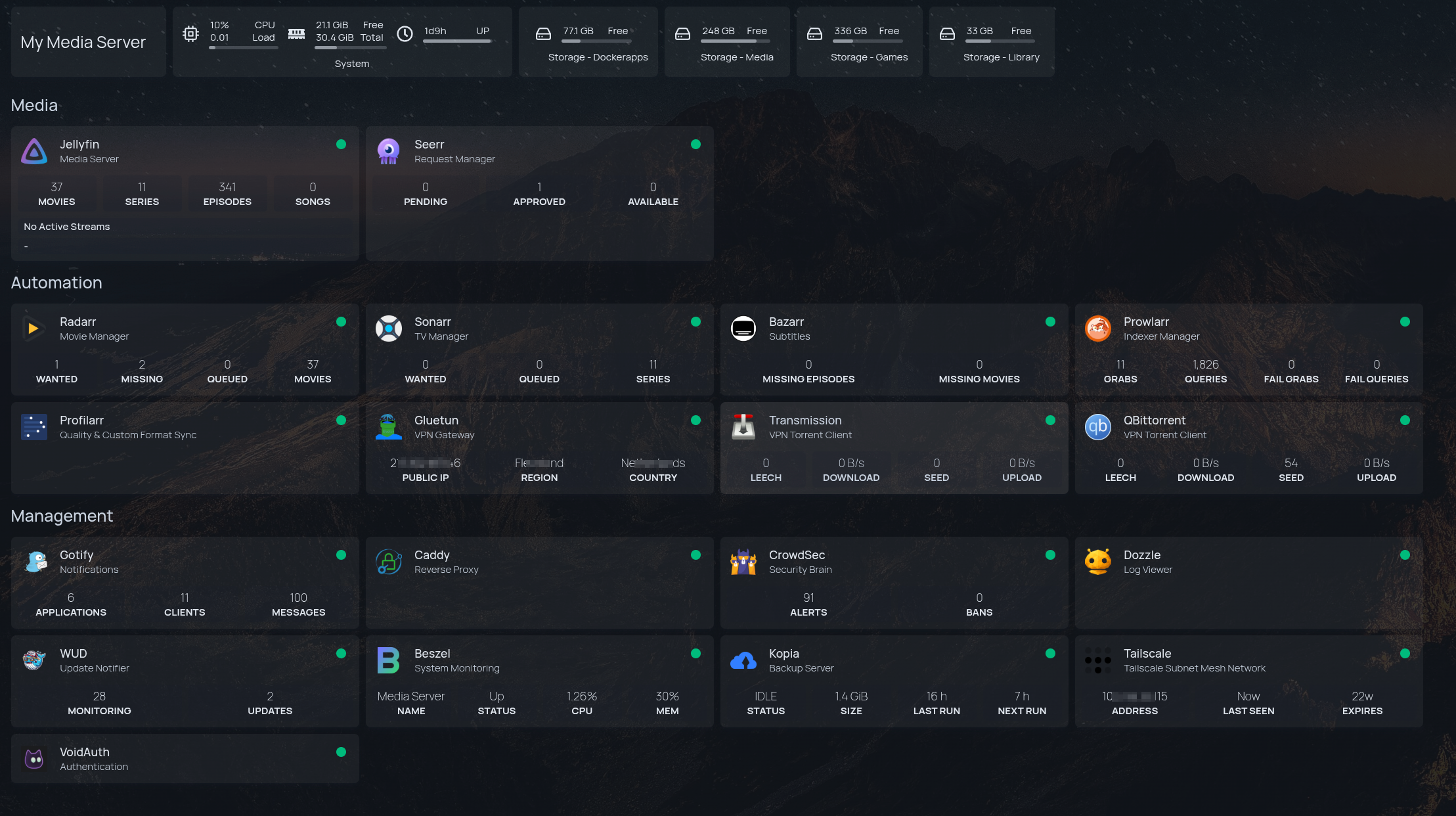
Services.yaml
Expand to view the full services.yaml file
- Media:
    - Jellyfin:
        icon: jellyfin.png
        href: http://172.20.0.10:8096
        description: Media Server
        container: jellyfin
        widget:
        type: jellyfin
        url: http://172.20.0.10:8096
        key: {{HOMEPAGE_VAR_JELLYFIN_KEY}}
        enableBlocks: true

    - Seerr:
        icon: jellyseerr.png
        href: http://172.20.0.12:5055
        description: Request Manager
        container: seerr
        widget:
        type: jellyseerr
        url: http://172.20.0.12:5055
        key: {{HOMEPAGE_VAR_SEERR_KEY}}

- Automation:
    - Radarr:
        icon: radarr.png
        href: http://172.20.0.13:7878
        description: Movie Manager
        container: radarr
        widget:
        type: radarr
        url: http://172.20.0.13:7878
        key: {{HOMEPAGE_VAR_RADARR_KEY}}

    - Sonarr:
        icon: sonarr.png
        href: http://172.20.0.14:8989
        description: TV Manager
        container: sonarr
        widget:
        type: sonarr
        url: http://172.20.0.14:8989
        key: {{HOMEPAGE_VAR_SONARR_KEY}}

    - Bazarr:
        icon: bazarr.png
        href: http://172.20.0.15:6767
        description: Subtitles
        container: bazarr
        widget:
        type: bazarr
        url: http://172.20.0.15:6767
        key: {{HOMEPAGE_VAR_BAZARR_KEY}}

    - Prowlarr:
        icon: prowlarr.png
        href: http://172.20.0.20:9696
        description: Indexer Manager
        container: prowlarr
        widget:
        type: prowlarr
        url: http://172.20.0.20:9696
        key: {{HOMEPAGE_VAR_PROWLARR_KEY}}

    - Profilarr:
        icon: profilarr.png
        href: http://172.20.0.19:6868
        description: Quality & Custom Format Sync
        container: profilarr
        #widget:
        #  type: profilarr
        #  url: http://172.20.0.19:6868

    - Gluetun:
        icon: gluetun.png
        href: "#"
        description: VPN Gateway
        container: gluetun
        widget:
        type: gluetun
        url: http://172.20.0.11:8000
        key: {{HOMEPAGE_VAR_GLUETUN_KEY}}

    #- Speedtest:
    #    icon: /icons/speedtest-tracker.png
    #    href: http://192.168.0.100:8085
    #    description: Gluetun VPN Speedtest Tracker
    #    container: speedtest-tracker
    #    widget:
    #      type: speedtest
    #      url: http://192.168.0.100:8085
    #      version: 1
    #      key: {{HOMEPAGE_VAR_SPEEDTEST_KEY}} # required for version 2
    #      bitratePrecision: 3 # optional, default is 0

    - Transmission:
        icon: transmission.png
        href: http://172.20.0.11:9091
        description: VPN Torrent Client
        container: transmission
        widget:
        type: transmission
        url: http://172.20.0.11:9091
        username: {{HOMEPAGE_VAR_TRANS_USER}}
        password: {{HOMEPAGE_VAR_TRANS_PASS}}

    - QBittorrent:
        icon: qbittorrent.png
        href: http://172.20.0.11:8080
        description: VPN Torrent Client
        container: qbittorrent
        widget:
        type: qbittorrent
        url: http://172.20.0.11:8080
        username: {{HOMEPAGE_VAR_QBIT_USER}}
        password: {{HOMEPAGE_VAR_QBIT_PASS}}

- Management:
    - Gotify:
        icon: gotify.png
        href: http://172.20.0.16:80
        description: Notifications
        container: gotify
        widget:
        type: gotify
        url: http://172.20.0.16:80
        key: {{HOMEPAGE_VAR_GOTIFY_KEY}}

    - Caddy:
        icon: caddy.png
        #href: http://172.20.0.23
        description: Reverse Proxy
        container: caddy

    - CrowdSec:
        icon: crowdsec.png
        #href: http://172.20.0.24:8080
        description: Security Brain
        container: crowdsec
        widget:
        type: crowdsec
        url: http://172.20.0.24:8080
        username: {{HOMEPAGE_VAR_CROWDSEC_USER}}
        password: {{HOMEPAGE_VAR_CROWDSEC_PASS}}
        fields: ["alerts", "bans"]

    - Dozzle:
        icon: dozzle.png
        href: http://172.20.0.26:8080
        description: Log Viewer
        container: dozzle
        #widget:
        #  type: dozzle
        #  url: http://172.20.0.26:8080

    - WUD:
        icon: /icons/wud.png
        href: http://localhost:3001
        description: Update Notifier
        container: wud
        widget:
        type: whatsupdocker
        url: http://172.20.0.27:3000
        username: {{HOMEPAGE_VAR_WUD_USER}}
        password: {{HOMEPAGE_VAR_WUD_PASS}}

    - Beszel:
        icon: beszel.png
        href: http://172.20.0.31:8090
        description: System Monitoring
        container: beszel-hub
        widget:
        type: beszel
        url: http://beszel-hub:8090
        username: {{HOMEPAGE_VAR_BESZEL_USER}}
        password: {{HOMEPAGE_VAR_BESZEL_PASS}}
        systemId: uwyihtywidc0b1x
        version: 2 # optional, default is 1

    - Kopia:
        icon: kopia.png
        href: http://172.20.0.33:51515
        description: Backup Server
        container: kopia
        widget:
        type: kopia
        url: http://172.20.0.33:51515
        username: {{HOMEPAGE_VAR_KOPIA_USER}}
        password: {{HOMEPAGE_VAR_KOPIA_PASS}}
        snapshotHost: kopia
        snapshotPath: /source/homelab/services

    - Tailscale:
        icon: tailscale
        href: https://login.tailscale.com/admin/machines
        description: Tailscale Subnet Mesh Network
        container: tailscale
        widget:
        type: tailscale
        deviceid: {{HOMEPAGE_VAR_TAILSCALE_DEVICE_ID}}
        key: {{HOMEPAGE_VAR_TAILSCALE_KEY}}


    #- Authentik:
    #    icon: authentik.png
    #    href: https://auth.{{HOMEPAGE_VAR_ROOT_DOMAIN}}
    #    description: Authentication
    #    container: authentik-server
    #    widget:
    #      type: authentik
    #      url: http://authentik-server:9000
    #      key: {{HOMEPAGE_VAR_AUTHENTIK_API_TOKEN}}
    #      version: 2

    - VoidAuth:
        icon: /icons/voidauth.png
        href: https://auth1.{{HOMEPAGE_VAR_ROOT_DOMAIN}}
        description: Authentication
        container: voidauth
Homepage .env variables
Homepage variables/secrets in the .env will always start with HOMEPAGE_VAR_
Expand to view the environment variables template
#### Generic ####
BACKUP_USER=<for_rclone_script>
PUID=1000
PGID=1000
TZ=Asia/Singapore

#### CADDY ####

#### CF DNS Zone API Token for domain.com ####
CLOUDFLARE_API_TOKEN=

#### Crowdsec Bouncer ####
CROWDSEC_API_KEY=

#### Root Domain ####
ROOT_DOMAIN=

#### For Maxmind GeoIP ####
MAXMIND_ACCOUNT_ID=
MAXMIND_LICENSE_KEY=

#### For VOIDAUTH ####
VOIDAUTH_STORAGE_KEY=
VOIDAUTH_DB_PASS=
VOIDAUTH_POSTGRES_PASS=
PASS_STRENGTH=2
APP_TITLE='Title_Goes_Here'

#### FOR JELLYFIN ####
#### CLOUDFLARED - CF TUNNEL IF USING THIS INSTEAD OF CADDY REVERSE PROXY ####
#CLOUDFLARE_TUNNEL_TOKEN=

#### FOR KOPIA ####
KOPIA_SERVER_USERNAME_HOST=admin@hostname
KOPIA_SERVER_PASSWORD=
KOPIA_REPO_PASSWORD=

#### FOR WUD ####

# Set the check-in seconds (86400 = 1 day)
WUD_POLL_CYCLE=21600

#### ADD THESE LINES FOR LINUXSERVER.IO ####
GITHUB_USER=
GITHUB_TOKEN=

#### ADD THESE LINES FOR DOCKERHUB ####
DOCKERHUB_USER=
DOCKERHUB_TOKEN=

#### For Gotify Trigger ####
GOTIFY_TOKEN=

#### Basic Auth ####
WUD_NAME_USER=
WUD_NAME_HASH=

#### FOR HOMEPAGE ####
HOMEPAGE_VAR_JELLYFIN_KEY=
HOMEPAGE_VAR_JELLYSEERR_KEY=
HOMEPAGE_VAR_RADARR_KEY=
HOMEPAGE_VAR_SONARR_KEY=
HOMEPAGE_VAR_BAZARR_KEY=
HOMEPAGE_VAR_PROWLARR_KEY=
HOMEPAGE_VAR_GOTIFY_KEY=
HOMEPAGE_VAR_TRANS_USER=
HOMEPAGE_VAR_TRANS_PASS=
HOMEPAGE_VAR_QBIT_USER=
HOMEPAGE_VAR_QBIT_PASS=
HOMEPAGE_VAR_CROWDSEC_USER=
HOMEPAGE_VAR_CROWDSEC_PASS=
HOMEPAGE_VAR_GLUETUN_KEY=
HOMEPAGE_VAR_BESZEL_USER=
HOMEPAGE_VAR_BESZEL_PASS=
HOMEPAGE_VAR_BESZEL_SYSID=
HOMEPAGE_VAR_KOPIA_USERNAME_HOST=admin@host
HOMEPAGE_VAR_KOPIA_PASS=
HOMEPAGE_VAR_AUTHENTIK_API_TOKEN=
HOMEPAGE_VAR_ROOT_DOMAIN=
HOMEPAGE_VAR_SPEEDTEST_KEY=
HOMEPAGE_VAR_TAILSCALE_DEVICE_ID=
HOMEPAGE_VAR_TAILSCALE_KEY="tskey-api-xxxx"

#### FOR BESZEL ####
MEDIASVR_PUBLIC_KEY="ssh-ed25519 xxxx"
MEDIASVR_TOKEN=

#### FOR ARCANE ####
ARCANE_KEY=
ARCANE_JWT_SECRET=

#### FOR GLUETUN ####

#### AIRVPN - WIREGUARD SETTINGS ####
# Go to AirVPN Client Area -> "WireGuard"
VPN_TYPE=wireguard
WIREGUARD_PRIVATE_KEY==
WIREGUARD_PRESHARED_KEY==
WIREGUARD_ADDRESSES=
SERVER_COUNTRIES=Singapore,Netherlands
# WIREGUARD_MTU=1300

#### AIRVPN PORT FORWARDING (CRITICAL) ####
# AirVPN Client Area -> "Port Forwarding"
# Request Ports and paste the 5-digit number here
AIRVPN_PORT_QBIT=
AIRVPN_PORT_TRANS=

#### TRANSMISSION CREDENTIALS ####
TRANSMISSION_USER=
TRANSMISSION_PASS=''

#### GLUETUN CONTROL SERVER SECURITY ####
# Enable logging for the control server
HTTP_CONTROL_SERVER_LOG=off

#### For SPEED TRACKER SERVICE ####
SPEED_KEY=

SONARR_API_KEY=
RADARR_API_KEY=
Crowdsec Widget in Homepgage
Unlike other services that use the Socket Proxy, the CrowdSec widget in Homepage connects directly to the CrowdSec Local API (LAPI) in the Gateway Stack.
- Auth Method: Requires
machine_loginandpassword, not an API Key. - Credential Location:
/mnt/pool01/homelab/services/gateway-stack/crowdsec/config/local_api_credentials.yaml
Settings.yaml
Expand to view the settings.yaml file
title: My Media Server
background:
image: https://images.pexels.com/photos/1624496/pexels-photo-1624496.jpeg
opacity: 30 # 0-100background:
#image: https://images.unsplash.com/photo-1506318137071-a8bcbf50dd55?ixlib=rb-1.2.1&auto=format&fit=crop&w=1920&q=80
brightness: 50
#blur: 50
theme: dark
color: slate
layout:
Media:
    style: row
    columns: 4
Automation:
    style: row
    columns: 4
Management:
    style: row
    columns: 4

useEqualHeights: true
statusStyle: "dot"
disableCollapse: true
headerStyle: boxedWidgets
What's Up Docker (WUD)
For WUD, in order to ensure the registries are being watched properly, may need to include the following secrets.
### FOR WUD ###

# Set the check-in seconds (86400 = 1 day)
WUD_POLL_CYCLE=21600

# https://getwud.github.io/wud/#/configuration/registries/
# LINUXSERVER.IO - WUD_REGISTRY_LSCR_LSCR_
GITHUB_USER=
GITHUB_TOKEN=ghp_0C8.....KD6Wz

# DOCKERHUB - WUD_REGISTRY_HUB_PUBLIC_
DOCKERHUB_USER=sfarhan79
DOCKERHUB_TOKEN=dckr_pat_sNbVu.....5kHhzg8

# Gotify Trigger WUD_TRIGGER_GOTIFY_LOCAL_TOKEN
GOTIFY_TOKEN=AMU...c1k

# Basic Auth
WUD_SFUSER=sfarhan
WUD_SFHASH=$$apr1$.....PGoN/