🤖 Service: Automation Stack (vpn-arr-stack)
This stack is the engine of the media server. It handles finding, downloading, renaming, and organizing content. It relies on a strict "Two-Zone" network architecture to ensure no torrent traffic leaks outside the VPN, while keeping management interfaces accessible.
Docker Internal Static IP
All of the Docker's custom static IP addresses (172.20.0.xx) in the compose file are manually given.
Compose File
Expand to view full Compose file
# ----------------------------------------
# Network Definition - Have already set this up beforehand
# ----------------------------------------

networks:
  dockerapps-net:
    external: true
services:

  ##################################################
  # GLUETUN (VPN Tunnel)
  ##################################################
  gluetun:
    image: qmcgaw/gluetun
    container_name: gluetun
    cap_add:
      - NET_ADMIN
      - SYS_MODULE
    devices:
      - /dev/net/tun:/dev/net/tun
      # This setting ensures IPv6 is enabled INSIDE the container
    sysctls:
      - net.ipv6.conf.all.disable_ipv6=0
    networks:
      dockerapps-net:
        ipv4_address: 172.20.0.11
        ipv6_address: fd00:dead:beef:2::11
    ports:
      # --- QBITTORRENT PORTS ---
      - 8080:8080 # qBittorrent Web UI (Host Port: 8080)
      #- 6881:6881       # QBT P2P Port (TCP) commented since using Airvpn Port Forwarding
      #- 6881:6881/udp   # QBT P2P Port (UDP) commented using Airvpn Port Forwarding
      # --- TRANSMISSION PORTS ---
      - 9091:9091 # Trans Web UI (Host Port: 9091)
      #- 6882:6882       # Trans P2P Port (TCP) commented since using Airvpn Port Forwarding
      #- 6882:6882/udp   # Trans P2P Port (UDP) commented since using Airvpn Port Forwarding
      # --- PROWLARR PORT ---
      #- 9696:9696 # Prowlarr Web UI
      # --- FLARESOLVERR PORT ---
      #- 8191:8191 # FlareSolverr Web UI
      # --- SPEEDTEST-TRACKER ---
      #- 8085:80
    volumes:
      # personal preference to split the config and auth folder locally. With only ./gluetun:/gluetun will also simply work
      - ./gluetun/config:/gluetun
      - ./gluetun/auth:/gluetun/auth:ro
      - /lib/modules:/lib/modules:ro
    environment:
      # --- General Settings
      - PUID=${PUID}
      - PGID=${PGID}
      - TZ=${TZ}
      # --- VPN Settings
      - VPN_SERVICE_PROVIDER=airvpn # This one is hardcoded, as it won't change
      - VPN_TYPE=${VPN_TYPE}
      - VPN_IPV6=yes
      # --- WireGuard Settings
      - WIREGUARD_PRIVATE_KEY=${WIREGUARD_PRIVATE_KEY}
      - WIREGUARD_PRESHARED_KEY=${WIREGUARD_PRESHARED_KEY}
      - WIREGUARD_ADDRESSES=${WIREGUARD_ADDRESSES}
      - SERVER_COUNTRIES=${SERVER_COUNTRIES}
      #- WIREGUARD_MTU=${WIREGUARD_MTU}
      # --- Port Forwarding
      - FIREWALL_VPN_INPUT_PORTS=${AIRVPN_PORT_QBIT},${AIRVPN_PORT_TRANS}
      # --- Adding below to prevent warning in logs and reduce ram usage
      - BLOCK_MALICIOUS=off
      - BLOCK_SURVEILLANCE=off
      - BLOCK_ADS=off
      # --- Disables DNS over TLS
      - DNS_UPSTREAM_RESOLVER_TYPE=plain
      # --- This maps internally to 1.1.1.1 (Cloudflare) and 8.8.8.8 (Google)
      - DNS_UPSTREAM_RESOLVERS=cloudflare,google
      #- LOG_LEVEL=debug
      # --- CONTROL SERVER SECURITY ---
      - HTTP_CONTROL_SERVER_LOG=${HTTP_CONTROL_SERVER_LOG}
      #- HTTP_CONTROL_SERVER_AUTH_DEFAULT_ROLE=${GLUETUN_AUTH_JSON} # commeting this out since pivot to using config.toml
    restart: unless-stopped

  ##################################################
  # QBITTORRENT (Client 1)
  ##################################################
  qbittorrent:
    image: linuxserver/qbittorrent:latest
    container_name: qbittorrent
    network_mode: service:gluetun
    environment:
      - PUID=${PUID}
      - PGID=${PGID}
      - TZ=${TZ}
      - WEBUI_PORT=8080 # This is the internal port. It is accessible on 8080 from the Gluetun service network.
      - WEBUI_HOST=* # Allows other containers to access the Web UI for integration
    volumes:
      - ./qbittorrent/config:/config
      - /mnt/pool01/media:/media
    healthcheck:
      test: curl -f --silent --output /dev/null http://localhost:8080 || exit 1
      interval: 30s
      timeout: 10s
      retries: 3
      start_period: 20s
    restart: unless-stopped
    depends_on:
      gluetun:
        condition: service_healthy

  ##################################################
  # TRANSMISSION (Client 2)
  ##################################################
  transmission:
    image: linuxserver/transmission:latest
    container_name: transmission
    network_mode: service:gluetun
    environment:
      - PUID=${PUID}
      - PGID=${PGID}
      - TZ=${TZ}
      - USER=${TRANSMISSION_USER} # transmission username
      - PASS=${TRANSMISSION_PASS} # transmission password
      - WEBUI_PORT=9091 # Internal Web UI port (must match Gluetun mapping)
      - PEERPORT=${AIRVPN_PORT_TRANS}
    volumes:
      - ./transmission/config:/config
      - /mnt/pool01/media:/media
    healthcheck:
      # We just want to know if the port is open!
      test: curl -s http://localhost:9091/ || exit 1
      interval: 30s
      timeout: 10s
      retries: 3
      start_period: 20s
    restart: unless-stopped
    depends_on:
      gluetun:
        condition: service_healthy

  ##################################################
  # PROWLARR (Indexer Manager)
  ##################################################
  prowlarr:
    image: linuxserver/prowlarr:latest
    container_name: prowlarr
    hostname: prowlarr
    networks:
      dockerapps-net:
        ipv4_address: 172.20.0.20
        ipv6_address: fd00:dead:beef:2::20
    # Forces container to use IPv4 only for outgoing connections
    sysctls:
      - net.ipv6.conf.all.disable_ipv6=1
    ports:
      - 9696:9696
    dns:
      - 1.1.1.1
      - 8.8.8.8
    environment:
      - PUID=${PUID}
      - PGID=${PGID}
      - TZ=${TZ}
    volumes:
      - ./prowlarr/config:/config
    depends_on:
      flaresolverr:
        condition: service_healthy
    restart: unless-stopped

##################################################
  # JACKETT (Indexer 2) - NEW SERVICE
  ##################################################
  jackett:
    image: linuxserver/jackett:latest
    container_name: jackett
    hostname: jackett
    networks:
      dockerapps-net:
        ipv4_address: 172.20.0.22
        ipv6_address: fd00:dead:beef:2::22
    # Forces container to use IPv4 only for outgoing connections
    #sysctls:
    #  - net.ipv6.conf.all.disable_ipv6=1
    ports:
      - 9117:9117 # default port for the Web UI
    dns:
      - 1.1.1.1
      - 8.8.8.8
    environment:
      - PUID=${PUID}
      - PGID=${PGID}
      - TZ=${TZ}
      - AUTO_UPDATE=true #optional
    volumes:
      - ./jackett/config:/config
      # This is for .torrent files, good practice
      - /mnt/pool01/media/downloads/jackett:/downloads
    #healthcheck:
    #  test: curl -f --silent --output /dev/null http://localhost:9117/ || exit 1
    #  interval: 30s
    #  timeout: 10s
    #  retries: 3
    #  start_period: 30s
    restart: unless-stopped
    depends_on:
      flaresolverr:
        condition: service_healthy

  ##################################################
  # RADARR (Movie Management)
  ##################################################
  radarr:
    image: linuxserver/radarr:latest
    container_name: radarr
    hostname: radarr
    networks:
      dockerapps-net:
        ipv4_address: 172.20.0.13
        ipv6_address: fd00:dead:beef:2::13
    environment:
      - PUID=${PUID}
      - PGID=${PGID}
      - TZ=${TZ}
    volumes:
      - ./radarr/config:/config
      - /mnt/pool01/media:/media
    ports:
      - 7878:7878
    restart: unless-stopped
    depends_on:
      qbittorrent:
        condition: service_healthy
      transmission:
        condition: service_healthy

  ##################################################
  # SONARR (TV Show Management)
  ##################################################
  sonarr:
    image: linuxserver/sonarr:latest
    container_name: sonarr
    hostname: sonarr
    networks:
      dockerapps-net:
        ipv4_address: 172.20.0.14
        ipv6_address: fd00:dead:beef:2::14
    environment:
      - PUID=${PUID}
      - PGID=${PGID}
      - TZ=${TZ}
    volumes:
      - ./sonarr/config:/config
      - /mnt/pool01/media:/media
    ports:
      - 8989:8989
    restart: unless-stopped
    depends_on:
      qbittorrent:
        condition: service_healthy
      transmission:
        condition: service_healthy

  ##################################################
  # BAZARR (Subtitle/Caption Manager)
  ##################################################
  bazarr:
    image: linuxserver/bazarr:latest
    container_name: bazarr
    hostname: bazarr
    networks:
      dockerapps-net:
        ipv4_address: 172.20.0.15
        ipv6_address: fd00:dead:beef:2::15
    environment:
      - PUID=${PUID}
      - PGID=${PGID}
      - TZ=${TZ}
    volumes:
      - ./bazarr/config:/config
      - /mnt/pool01/media:/media
    ports:
      - 6767:6767
    restart: unless-stopped
    depends_on:
      radarr:
        condition: service_started
      sonarr:
        condition: service_started

  ##################################################
  # FLARESOLVERR (Challenge Solver)
  ##################################################
  flaresolverr:
    image: flaresolverr/flaresolverr:latest
    container_name: flaresolverr
    hostname: flaresolverr
    networks:
      dockerapps-net:
        ipv4_address: 172.20.0.21
        ipv6_address: fd00:dead:beef:2::21
    ports:
      - 8191:8191
    environment:
      - PUID=${PUID}
      - PGID=${PGID}
      - TZ=${TZ}
      - LOG_LEVEL=info
      - LOG_FILE=/config/flaresolverr.log
    volumes:
      - ./flaresolverr/config:/config
    healthcheck:
      test: curl -f --silent --output /dev/null http://localhost:8191/ || exit 1
      interval: 5m        # Check every 5 minutes (Quiet logs)
      timeout: 10s
      retries: 3
      start_period: 20s   # Grace period for slow startup
      start_interval: 5s  # CRITICAL: Check rapidly (every 5s) during startup so Prowlarr doesn't wait 5 mins
    restart: unless-stopped

  ##################################################
  # PROFILARR (Quality Settings & Custom Format Syncs)
  ##################################################
  profilarr:
    image: santiagosayshey/profilarr:latest
    container_name: profilarr
    hostname: profilarr
    networks:
      dockerapps-net:
        ipv4_address: 172.20.0.19
        ipv6_address: fd00:dead:beef:2::19
    ports:
      - 6868:6868 # Default port for the Web UI
    environment:
      - PUID=${PUID}
      - PGID=${PGID}
      - TZ=${TZ}
    volumes:
      - ./profilarr/config:/config
    restart: unless-stopped
    depends_on:
      radarr:
        condition: service_started
      sonarr:
        condition: service_started

  ##################################################
  # SPEEDTEST TRACKER
  ##################################################
#  speedtest-tracker:
#    image: lscr.io/linuxserver/speedtest-tracker:latest
#    container_name: speedtest-tracker
#    # CRITICAL: Route everything through Gluetun
#    network_mode: service:gluetun
#    environment:
#      - PUID=${PUID}
#      - PGID=${PGID}
#      - TZ=${TZ}
#      - APP_KEY=base64:${SPEED_KEY}
#      - DB_CONNECTION=sqlite
#      - APP_URL=http://192.168.0.100:8085
#      # Schedule: Run at minute 0 past every hour (Cron format)
#      - SPEEDTEST_SCHEDULE=0 * * * *
#    volumes:
#      - ./speedtest-tracker:/config
#    restart: unless-stopped
#    depends_on:
#      - gluetun

  ##################################################
  # RECYCLARR
  ##################################################
  #recyclarr:
  #  image: ghcr.io/recyclarr/recyclarr
  #  container_name: recyclarr
  #  hostname: recyclarr
  #  networks:
  #    dockerapps-net:
  #      ipv4_address: 172.20.0.38
  #      ipv6_address: 2001:db8:abc2::38
  #  user: 1000:1000
  #  volumes:
  #    - ./recyclarr/config:/config
  #  environment:
  #    - TZ=${TZ}
  #    - SONARR_API_KEY=${SONARR_API_KEY}
  #    - RADARR_API_KEY=${RADARR_API_KEY}
  #  restart: unless-stopped
Dependencies & Startup
The compose file defines following dependencies:
- Gluetun starts first.
- Download Clients wait for
service_healthyfrom Gluetun. - Managers (Radarr/Sonarr) wait for Download Clients.
- Profilarr waits for Radarr/Sonarr.
VPN Gateway
Gluetun, Qbittorrent and Transmission live inside the VPN bubble. Qbit and Transmission do not have their own IP addresses; they share the network stack of the gluetun container.
Gluetun
- Role: VPN Tunnel & Firewall. All download traffic MUST go through here.
- Static IP:
172.20.0.11 - Provider: AirVPN (WireGuard).
Key Configs:
devices: /dev/net/tun: Required for the VPN interface to spawn.sysctls: net.ipv6.conf.all.disable_ipv6=0: Enables IPv6 inside the tunnel.- Healthcheck: The container has a built-in healthcheck. Dependent services will NOT start until the VPN tunnel is fully established.
Advanced: Control Server (API Access for Homepage)
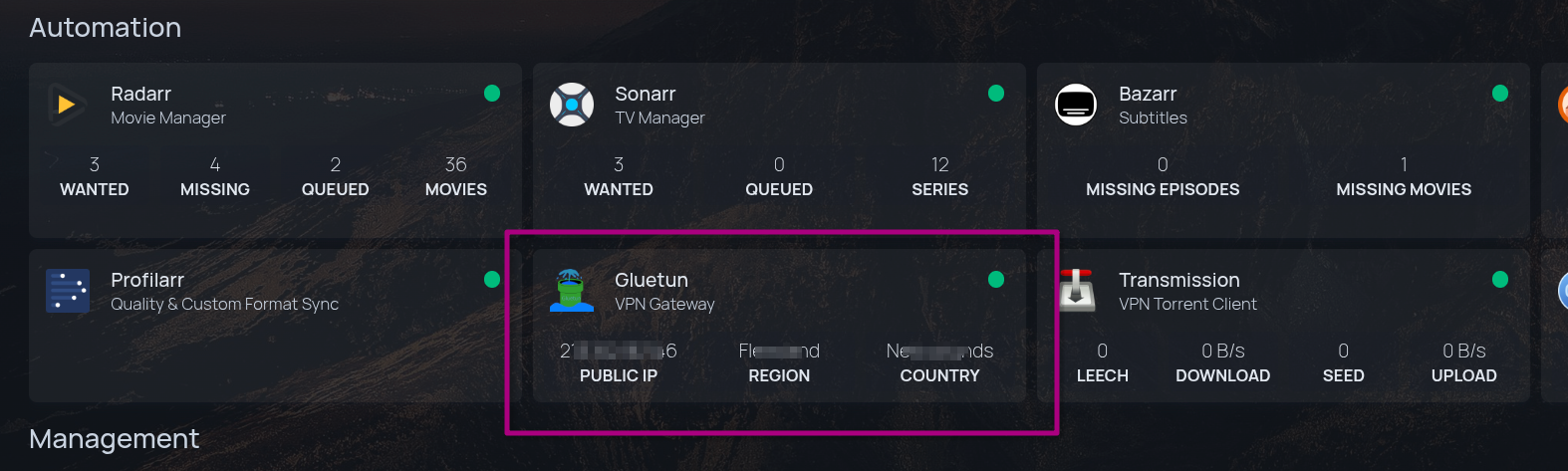
Enabled to allow the Homepage dashboard to query the VPN status (Real Public IP & Port Forwarding status) via a secure API. More info here at Gluetun's Wiki
- Generate API Key:
docker run --rm qmcgaw/gluetun genkey -
Configuration File: Create
../gluetun/auth/config.toml:[[roles]] name = "homepage" auth = "apikey" apikey = "YOUR_GENERATED_KEY_HERE" routes = ["GET /v1/publicip/ip", "GET /v1/portforward"] -
Docker Mount: Ensure
- ./gluetun/auth:/gluetun/auth:rois in our compose file.
Download Clients
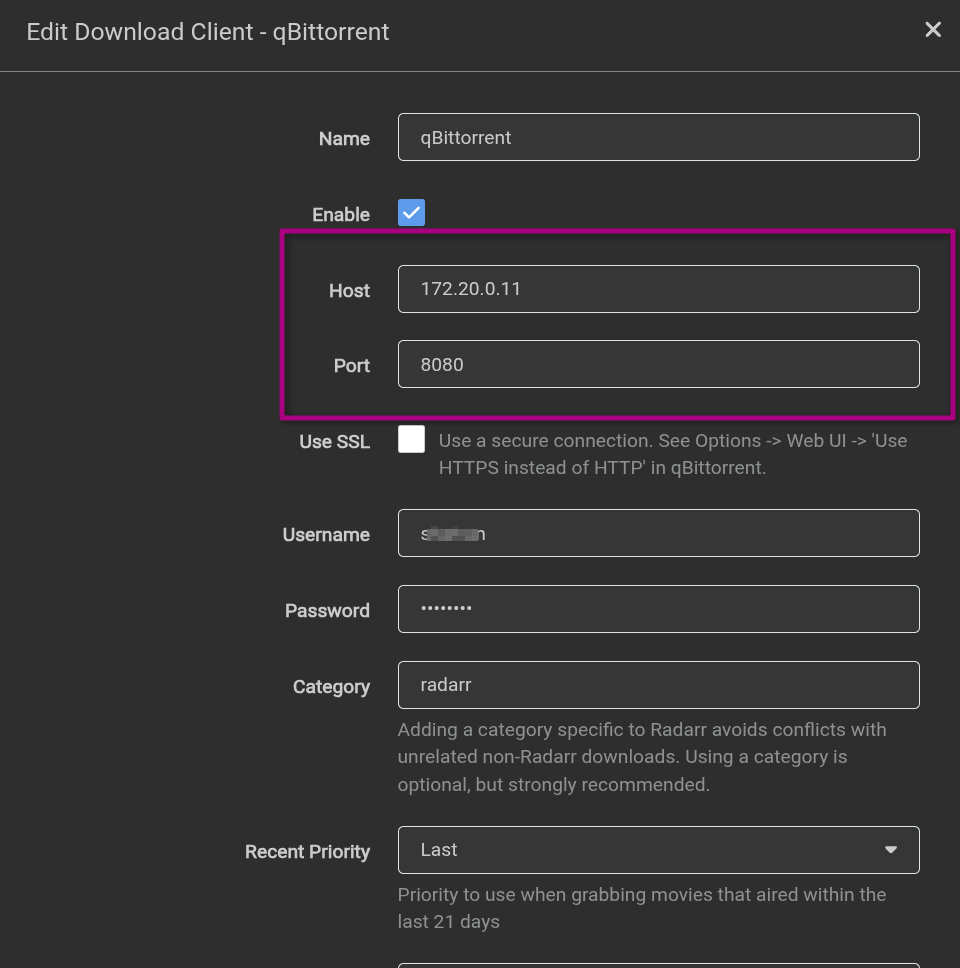
Because these containers use network_mode: service:gluetun, their Web UIs are accessed via Gluetun's IP (172.20.0.11), and their ports must be opened on the Gluetun container itself.
- qBittorrent (Primary):
http://172.20.0.11:8080 - Transmission (Fallback):
http://172.20.0.11:9091
Port Forwarding (AirVPN)
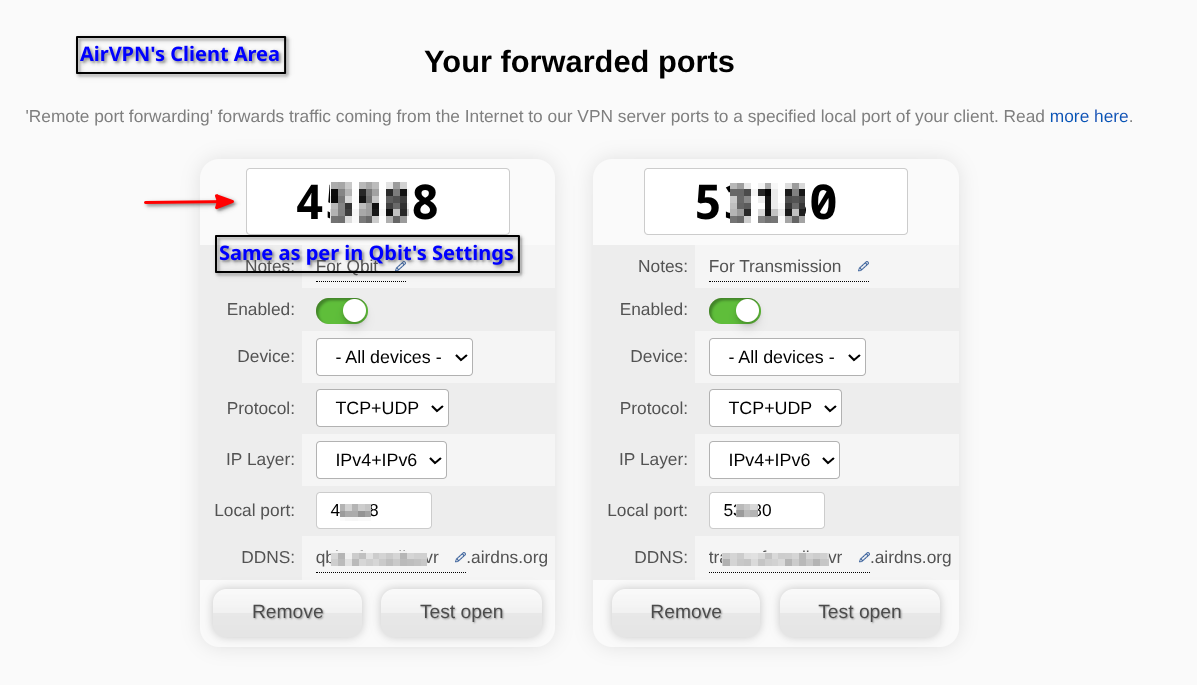
- Must configure port forwarding in the AirVPN Client Area
- Add these ports to our
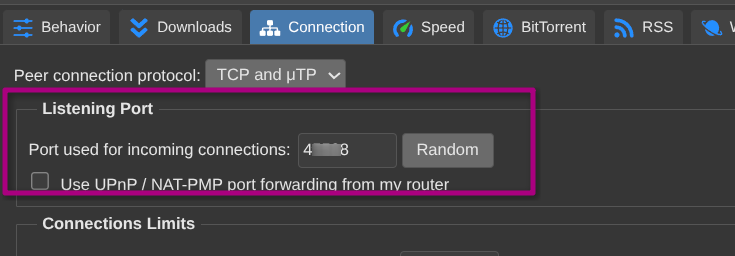
.envfile (e.g.,AIRVPN_PORT_QBIT) - Double check that the specified AirVPN's Port number shows up in Qbit's settings under "Connection"->"Port used for incoming connections"
- Refer to AirVPN setup guide in Networking section
qBittorrent (Primary Downloader)
- Role: Torrent client.
- Network Mode:
service:gluetun(No IP). - Web UI: Accessed via
http://172.20.0.11:8080. - Storage: Maps
/mnt/pool01/media:/mediato allow atomic moves to the library. - Port Forwarding: Configured in AirVPN's Client Area Settings and double check that the specified AirVPN's Port number shows up in Qbit's settings under "Connection"->"Port used for incoming connections".
Transmission (Secondary Downloader)
- Role: Backup/Alternative client.
- Network Mode:
service:gluetun(No IP). - Web UI: Accessed via
http://172.20.0.11:9091. - Storage: Maps
/mnt/pool01/media:/media. - Port Forwarding: Uses AirVPN Port ->
- FIREWALL_VPN_INPUT_PORTS=${AIRVPN_PORT_QBIT},${AIRVPN_PORT_TRANS}
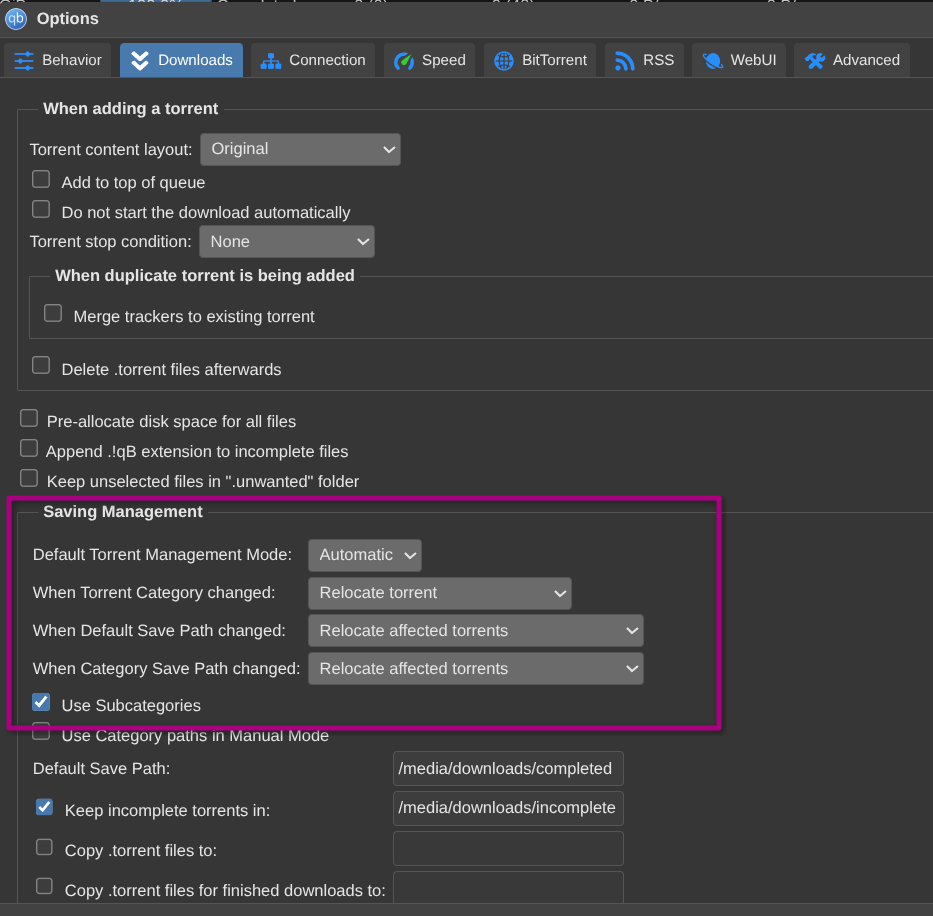
Expand to View Qbit's Settings for Saving Management
Expand to view Qbit's Settings for Port Forwarding
The *Arr Core
Radarr (Movies)
- Static IP:
172.20.0.13 - Port:
7878 - Critical Settings:
- Root Folders:
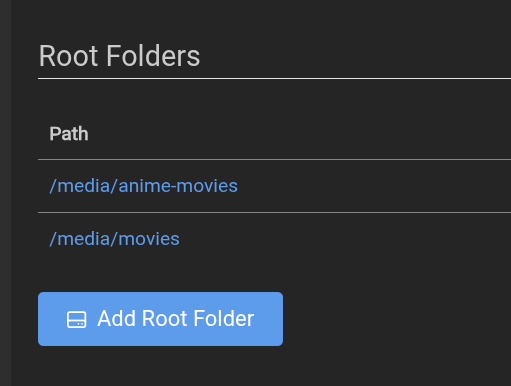
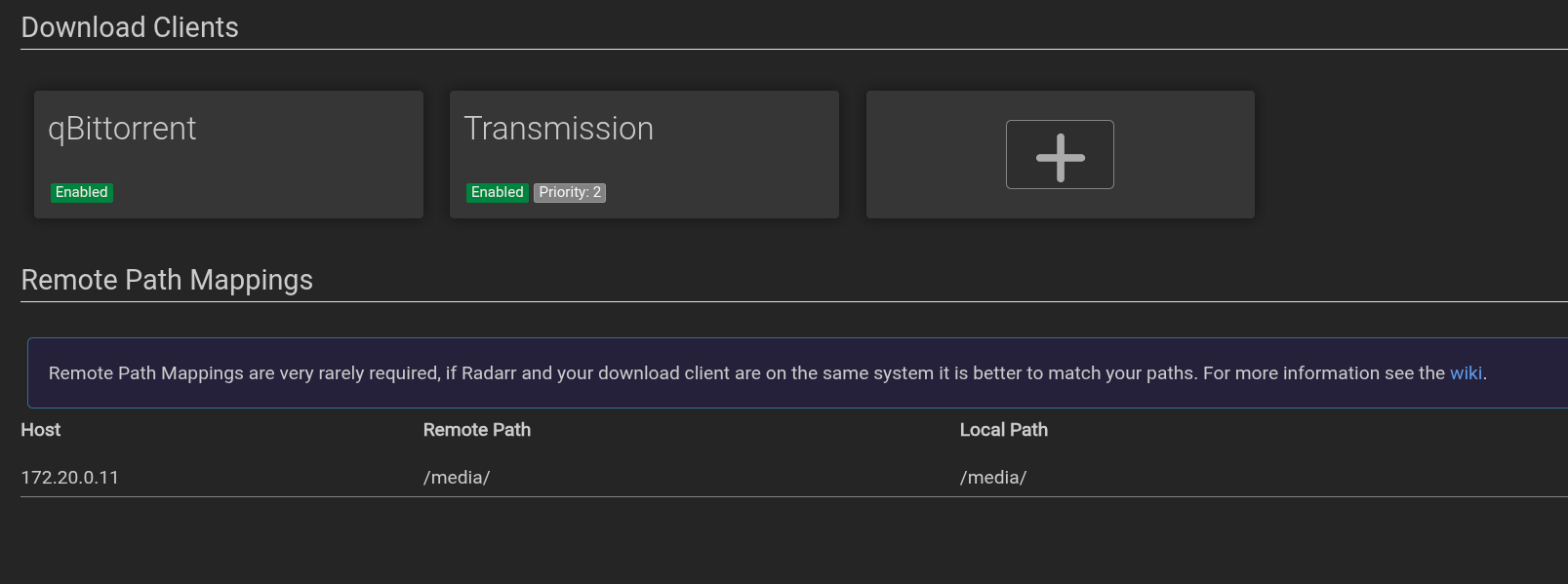
/media/movies(Standard) and/media/anime-movies(Anime). - Remote Path Mapping: Maps Host
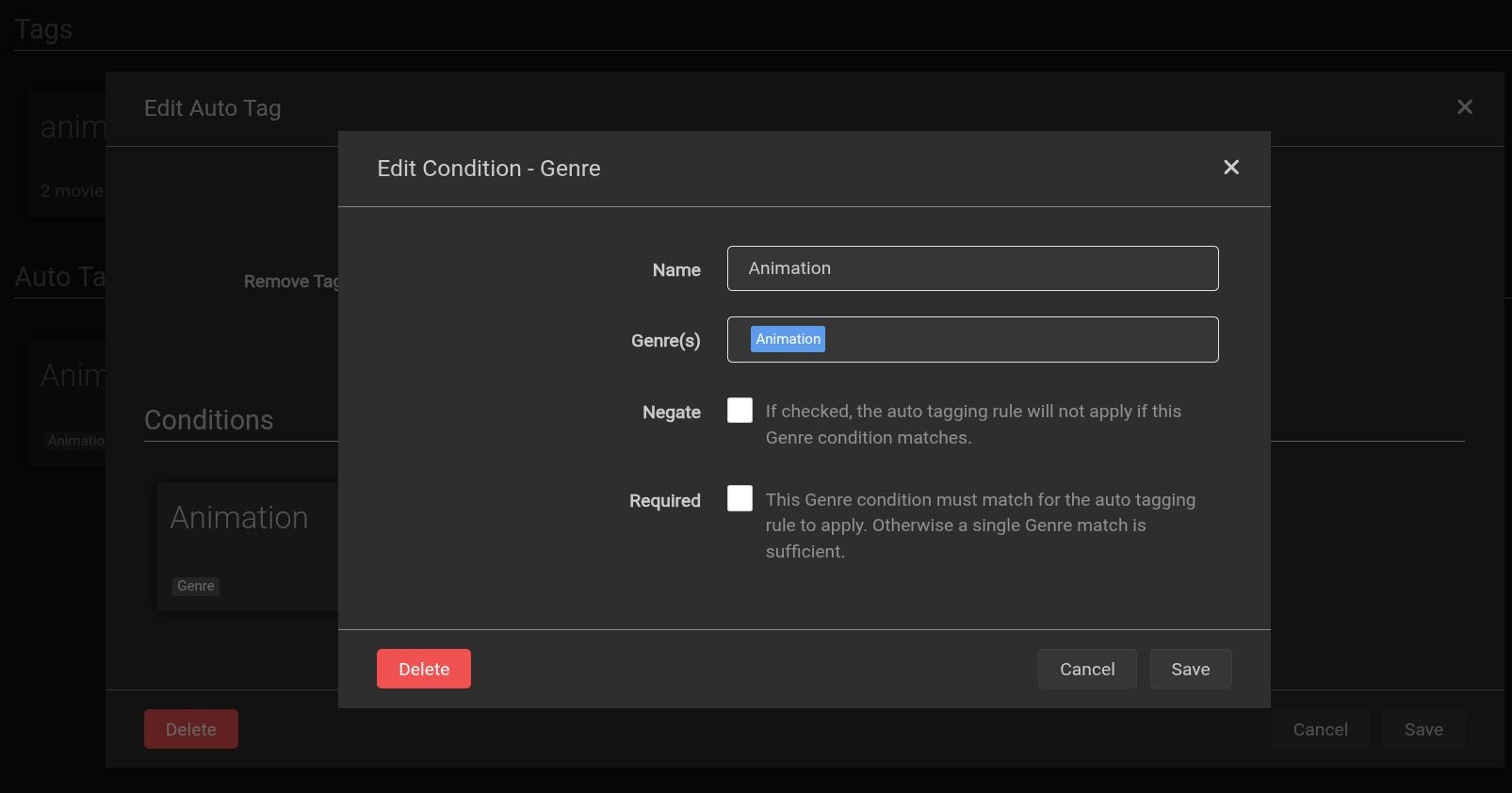
172.20.0.1Path/mediato Local Path/media. - Tags: Auto-tags "Animation" genre with
anime.
- Root Folders:
Sonarr (TV Shows)
- Static IP:
172.20.0.14 - Port:
8989 - Critical Settings:
- Root Folders:
/media/shows(Standard) and/media/anime-shows(Anime). - Remote Path Mapping: Maps Host
172.20.0.1Path/mediato Local Path/media. - Tags: Auto-tags "Anime" series type with
anime.
- Root Folders:
Radarr, Sonarr Wiki Guides
Refer to Servarr Wiki for best guide: https://wiki.servarr.com/radarr and https://wiki.servarr.com/en/sonarr
Bazarr (Subtitles)
- Static IP:
172.20.0.15 - Port:
6767 - Connection: Connects to Radarr/Sonarr to see what files need subtitles.
Bazarr Wiki Guide
Refer to their Wiki for best guide: https://wiki.bazarr.media/Getting-Started/Setup-Guide/
Radarr & Sonarr Set Up Screenshots
Screenshot for Root Folders
Settings -> Media Management:
Screenshot for Download Clients
Settings -> Download Clients:
Screenshot for Anime Tag
Settings -> Tags:
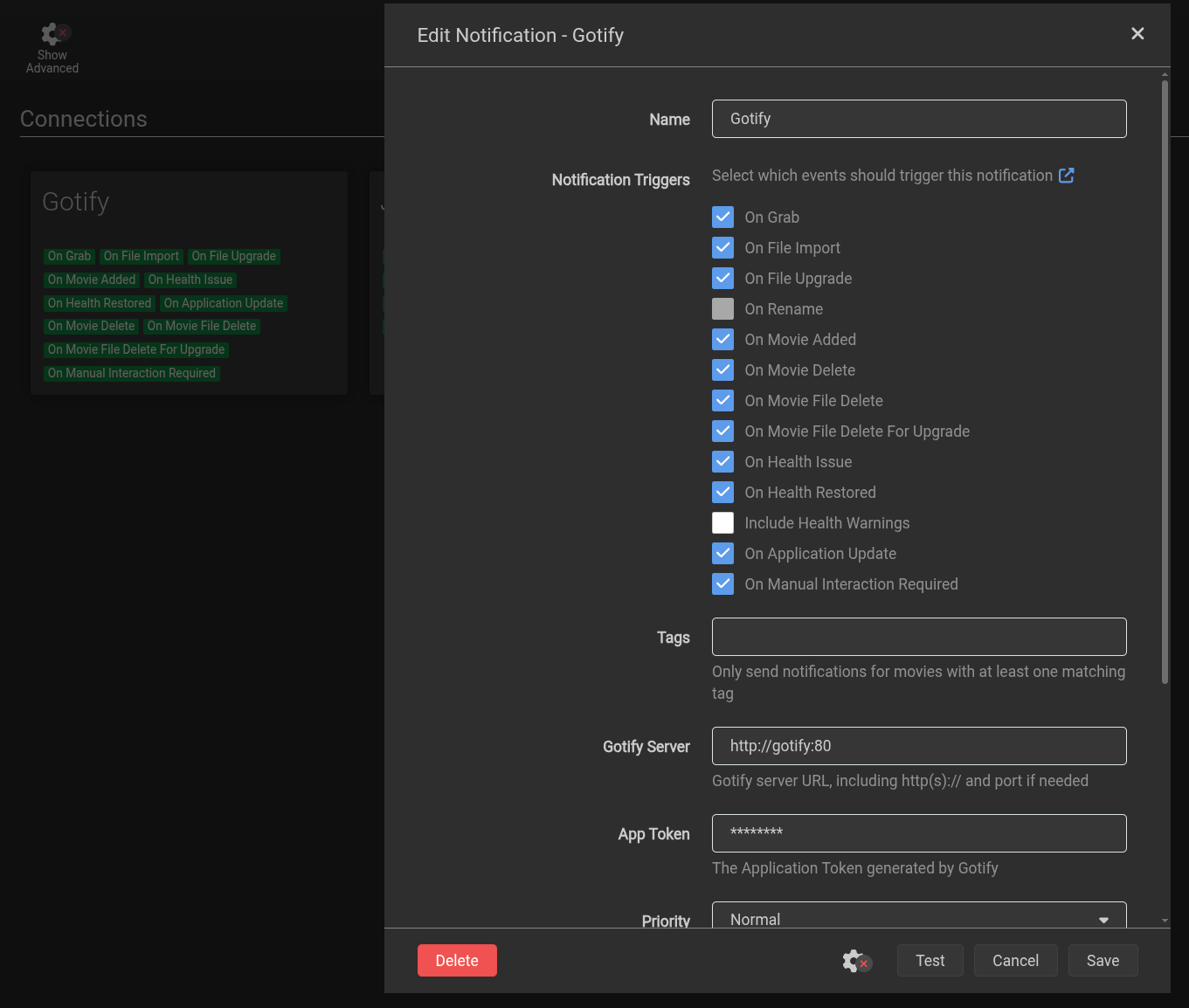
Screenshot for Gotify Connect
Settings -> Connect:
The Indexers & Utilities
Prowlarr
- Static IP:
172.20.0.20 - Port:
9696 - Role: Manages torrent trackers and syncs them to Radarr/Sonarr.
- DNS Fix: Configured with
dns: [1.1.1.1, 8.8.8.8]to bypass host DNS issues. - Proxy: Uses
flaresolverrto bypass Cloudflare protections on trackers.
FlareSolverr (Captcha Solver)
- Static IP:
172.20.0.21 - Port:
8191 - Role: Solves Cloudflare challenges for Prowlarr/Jackett.
Jackett (Useful Proxy)
- Static IP:
172.20.0.22 - Port:
9117 - Role: Used only for specific trackers that Prowlarr struggles with.
- Integration: Added to Prowlarr as a "Generic Torznab" indexer.
Profilarr (Quality Settings & Custom Formats)
- Static IP:
172.20.0.19 - Port:
6868 - Role: Automatically syncs optimal quality profiles and custom formats to Radarr/Sonarr.
Anime Grab with Profilarr
For more info on Profilarr (set against trying to configure an Anime Quality Profile setup), read the write-up here
Indexer Management
While Prowlarr is the primary manager, we utilize Jackett as a fallback backend for specific trackers that have difficult Cloudflare protections. Both services rely on FlareSolverr to bypass CAPTCHAs.
Prowlarr Wiki Guide
Refer to Servarr Wiki for best Prowlarr Guide: https://wiki.servarr.com/en/prowlarr
Prowlarr, Flaresolverr Setup with Radarr/Sonarr
Expand for Prowlarr, Flaresolverr Set-Up with Radarr/Sonarr
Prowlarr Overview
Prowlarr acts as the central Indexer Hub. Instead of adding tracker URLs and API keys to Radarr and Sonarr individually, we add them once in Prowlarr. Prowlarr then automatically syncs them to all our media apps.
Note:
In this specific stack, Prowlarr runs outside the VPN (dockerapps-net) to avoid "Bad Neighbor" blocks common with VPN IPs. It relies on FlareSolverr to handle Cloudflare challenges.
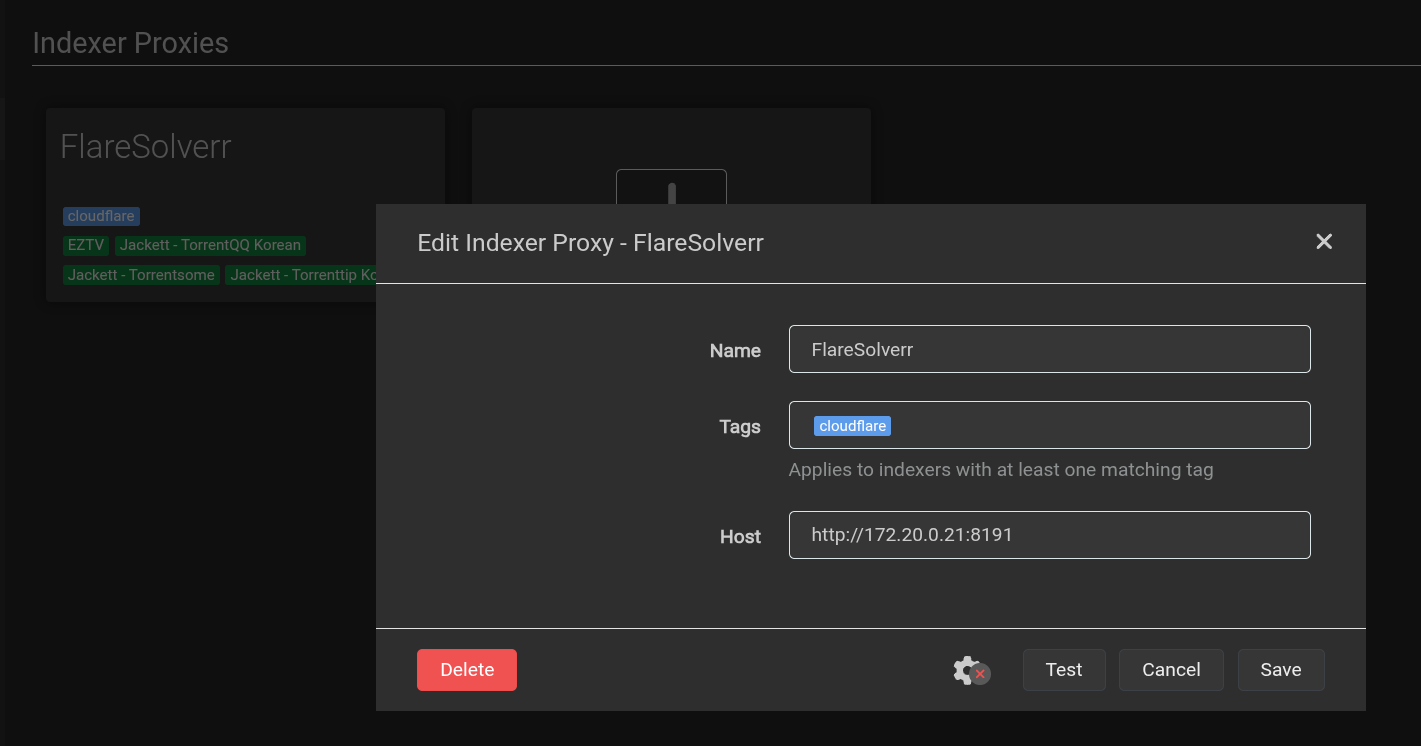
Connect FlareSolverr (Critical)
This step ensures Prowlarr can bypass Cloudflare protections on tracker sites.
- Access UI: Open
http://localhost:9696orhttp://172.20.0.20:9696in our browser. - Navigate: Settings -> Indexers.
- Add Proxy: Scroll to "FlareSolverr" and click the (+) button.
- Configure:
- Name:
FlareSolverr - Tags:
cloudflare - Host:
http://flaresolverr:8191
- Name:
- Test & Save: Click Test (Expect: "FlareSolverr is ready!") -> Save.
Add Indexers
- Navigate: Go to Indexers -> Add Indexer (+).
- Search: Find our tracker (e.g.,
1337x,TorrentLeech). - Configure:
- Base URL: (Use default)
- Tags: (Optional)
- Private Trackers: Enter credentials/Cookie if required.
- Test: Click Test.
- Success: Prowlarr successfully connected via FlareSolverr.
- Save.
Sync with Radarr & Sonarr
This automates the hand-off. Prowlarr will "push" the indexers to our apps.
Step A: Get the App API Key
- Open Radarr (
http://172.20.0.13:7878). - Go to Settings -> General -> Security.
- Copy the API Key.
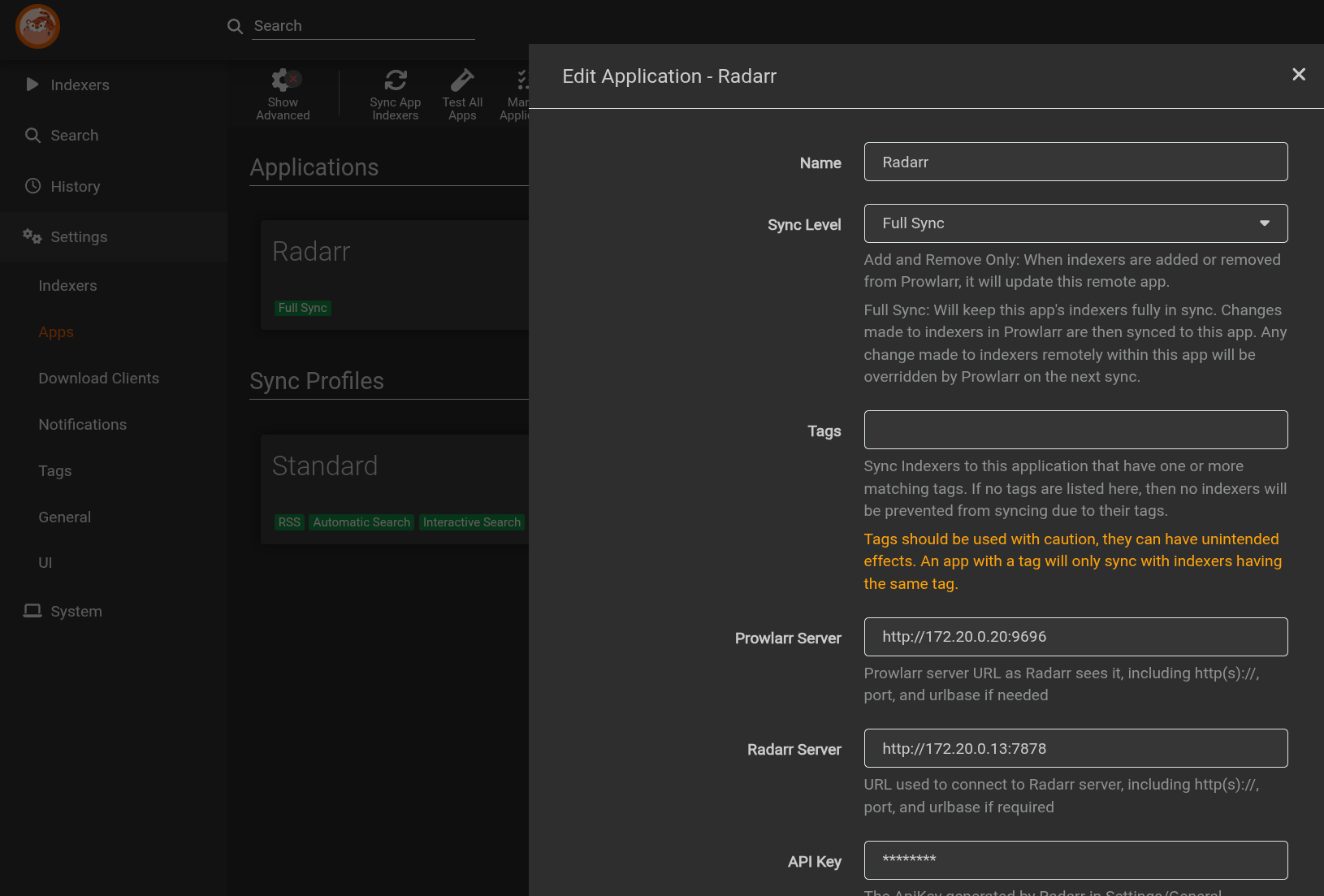
Step B: Add App to Prowlarr
- Return to Prowlarr.
- Go to Settings -> Apps -> Click (+) -> Select Radarr.
- Configure:
- Prowlarr Server:
http://172.20.0.20:9696- (This tells Radarr how to call back to Prowlarr).
- Radarr Server:
http://172.20.0.13:7878 - API Key: Paste the Radarr key from Step A.
- Sync Level:
Full Sync(Recommended).
- Prowlarr Server:
- Test & Save.
*(Repeat Step 4 for Sonarr, using Sonarr's API Key and note Sonarr's IP)
Jackett Integration with Prowlarr
Expand to view Jackett integration steps with Prowlarr
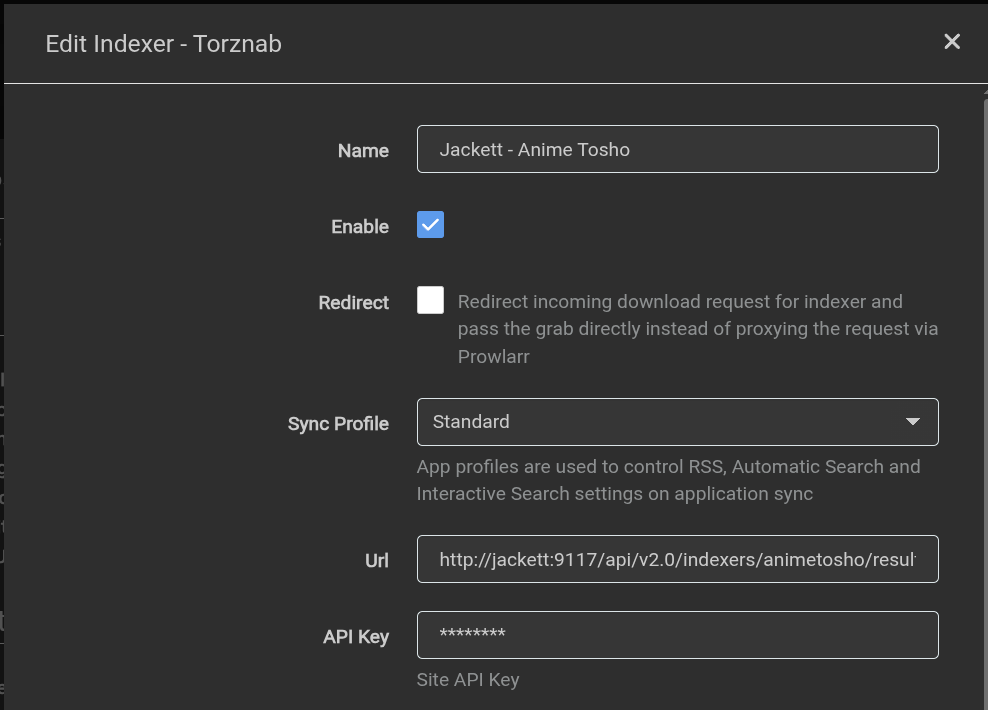
Link Jackett to Prowlarr (As a Tracker)
-
Get the Feed URL:
- In Jackett, click "Copy Torznab Feed" (Blue button).
- Example:
http://172.20.0.22:9117/api/v2.0/indexers/all/results/torznab/
-
Add to Prowlarr:
- Prowlarr > Indexers > Add Indexer > Search "Torznab" (Generic).
- URL: Paste the long Jackett URL.
- API Key: Paste the API Key from Jackett (top-right).
- Categories: Map standard categories (2000, 5000, etc.).
Directory Layout
The structure is organized to separate "raw" downloads from "clean" library files while keeping them on the same partition.
/mnt/pool01/media/
├── downloads/               # Raw Ingest Zone
│   ├── incomplete/          # Temporary folder for active downloads
│   ├── radarr/              # Completed Movies (qBit Category: radarr)
│   ├── sonarr/              # Completed TV Shows (qBit Category: sonarr)
│   ├── radarr-anime/        # Completed Anime Movies (qBit Category: radarr-anime)
│   └── sonarr-anime/        # Completed Anime TV (qBit Category: sonarr-anime)
│
├── movies/                  # Clean Movie Library (Hardlinks)
├── shows/                   # Clean TV Library (Hardlinks)
├── anime-movies/            # Clean Anime Movie Library
└── anime-shows/             # Clean Anime TV Library
Hardlink
For hardlinks to work, the Download Client and the Media Manager must perceive the file as existing on the same file system.
We achieve this by mapping the root of the LVM volume (/mnt/pool01/media) to the same internal path (/media) in every single container.
Check out the Lifecycle of a Request story-mode on how the
end-to-endmedia server currently works