Caddy (Reverse Proxy)
Architecture Overview
| Service | Role | Key Function |
|---|---|---|
| Caddy | Reverse Proxy | The "Front Door". Handles SSL, Geo-Blocking (Layer 1), and Traffic Routing. |
| CrowdSec | Intrusion Detection | The "Brain". Reads logs, detects attacks, and instructs Caddy to ban IPs (Layer 2). |
| MaxMind | GeoIP | Provides Geo-Data for Caddy (blocking) and GoAccess (mapping). Auto-updates weekly. |
| VoidAuth | Identity Provider | Centralized SSO for protecting internal services. |
Caddy Compose File
networks:
  dockerapps-net:
    external: true

services:
# ------------------------------------------------
# 1. CADDY (Reverse Proxy)
# ------------------------------------------------
  caddy:
    image: serfriz/caddy-cloudflare-ddns-crowdsec-geoip:latest
    container_name: caddy
    hostname: caddy
    networks:
      dockerapps-net:
        # Caddy's internal static IP
        ipv4_address: 172.20.0.23
        ipv6_address: fd00:dead:beef:2::23
    ports:
      - "80:80"
      - "443:443"
    environment:
      - PUID=${PUID}
      - PGID=${PGID}
      - TZ=${TZ}
      - CLOUDFLARE_API_TOKEN=${CLOUDFLARE_API_TOKEN}
        # Caddy comms with Crowdsec
      - CROWDSEC_LAPI_URL=http://crowdsec:8080
      - CROWDSEC_API_KEY=${CROWDSEC_API_KEY}
      - ROOT_DOMAIN=${ROOT_DOMAIN}
      # This is for Caddy's basic_auth if we want to use it
      #- LOGS_USER=${LOGS_USER}
      #- LOGS_PASS_HASH=${LOGS_PASS_HASH}
    volumes:
      - ./Caddyfile:/etc/caddy/Caddyfile # Caddy's config file
      - ./data:/data                      # For certs & persistent data
      - ./config:/config                  # For Caddy's internal config
      - ./logs:/var/log/caddy
      # Mount the Maxmind Folder - Caddy will read from /etc/caddy/maxmind/GeoLite2-Country.mmdb
      - ./maxmind:/etc/caddy/maxmind:ro
      # Since we no longer serving goaccess via a sub-domain through caddy anymore, commenting this out
      # - ./goaccess/html:/srv/goaccess-report
    restart: unless-stopped

# ------------------------------------------------
# 2. MAXMIND UPDATER (Auto-Updates Geo-IP DBs)
# ------------------------------------------------
  maxmind:
    image: ghcr.io/maxmind/geoipupdate
    container_name: maxmind
    networks:
      dockerapps-net:
        ipv4_address: 172.20.0.30
        ipv6_address: fd00:dead:beef:2::30
    user: "${PUID}:${PGID}"
    environment:
      - GEOIPUPDATE_ACCOUNT_ID=${MAXMIND_ACCOUNT_ID}
      - GEOIPUPDATE_LICENSE_KEY=${MAXMIND_LICENSE_KEY}
      # Focusing only on Countries, cities can be included if need be
      - GEOIPUPDATE_EDITION_IDS=GeoLite2-Country
      # Update from maxmind database every 5 days
      - GEOIPUPDATE_FREQUENCY=72
    volumes:
      # Maps local 'maxmind' folder to the container's data folder
      - ./maxmind:/usr/share/GeoIP
    restart: unless-stopped
MaxMind (GeoIP Provider) as Shared Volume
Instead of manually downloading .mmdb files and uploading them to the server, we use an official MaxMind "Sidecar" container. This container runs on a schedule, downloads the latest databases, and places them into a Shared Volume that both Caddy and GoAccess can read.
This is an architectural decision that I prefer to have. We do not copy files between containers. We mount a single host directory to multiple containers.
- Host Path:
./maxmind(Relative to the Caddy folder, where compose file resides) - MaxMind Container: Writes to
/usr/share/GeoIP - Caddy Container: Reads from
/etc/caddy/maxmind(ReadOnly)
Maxmind Setup
To enable this, we registered a free account at MaxMind and generated a License Key. These secrets are stored in the .env file.
Refer here from Maxmind's website on how to generate a license key.
Expand to view screenshot for Maxmind Account ID and Key
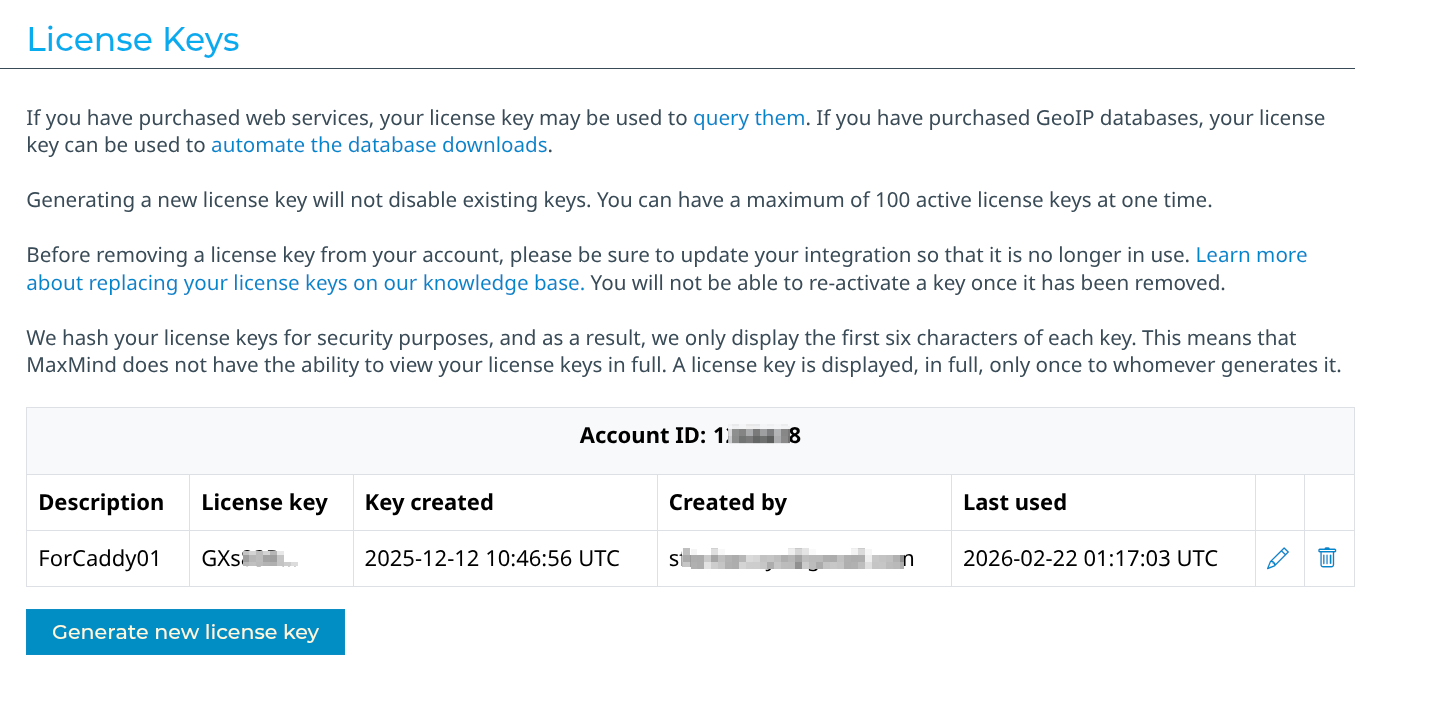
Note: On the very first run, Caddy might fail to start because the
.mmdbfile doesn't exist yet. The fix is to let the MaxMind container run for ~30 seconds to finish the download, then restart Caddy.
Caddy Build
Unlike other services where we pull a standard image and since we want several modules/plugins behind main Caddy, we thankfully have: https://github.com/serfriz/caddy-custom-builds that we can use.
This is because the standard Caddy image does not include the specific plugins we need for our security and automation logics.
Configuration (Critical)
Key Configuration Points:
- Network: Uses
dockerapps-netwith a Static IP (.23) so other containers can trust it as a known proxy. - Ports: Maps
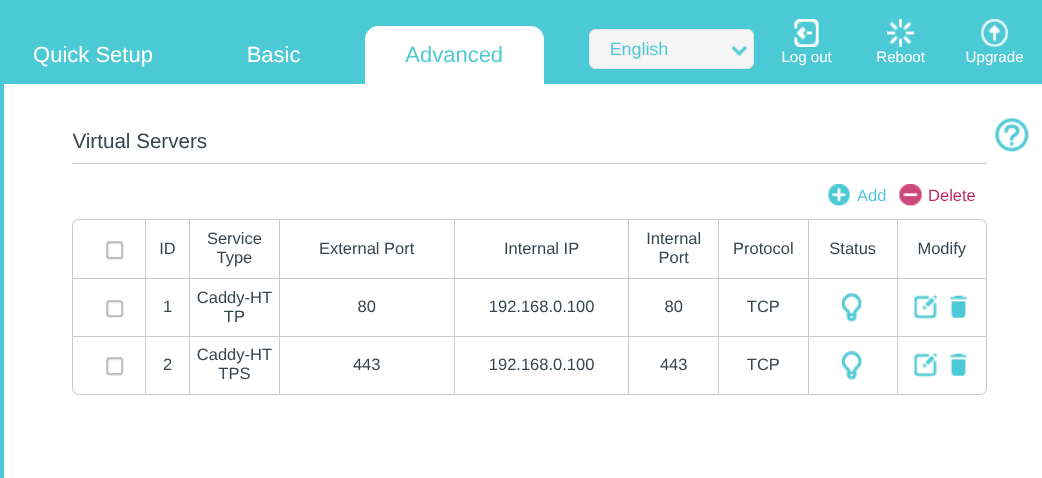
80:80and443:443directly to the host to handle incoming web traffic. - Port Forwarding x Home Router: To port forward Caddy for HTTPS (ports 80/443), log into our router, create two firewall rules (TCP) forwarding
external 80/443to ourServer's Local IPon the same ports. Like so, on my home TP-link router (which they call it as "Virtual Server" setting):
- Volumes:
./logs: Critical for CrowdSec (the "Brain") to read the access logs generated here../maxmind: Now mounts the shared folder from the auto-updater instead of a static file.
Caddyfile & Snippets
# --- Global Options ---
{
    #debug (uncomment this for troubleshooting)

    dynamic_dns {
        provider cloudflare {env.CLOUDFLARE_API_TOKEN}
        domains {
            {$ROOT_DOMAIN} jellyfin requests gotify auth1
        }
        # IPv6 Support: We previously forced 'versions ipv4', but dual-stack is now confirmed stable on SG 5G networks once Rocket Loader conflicts are resolved.
        #Forcing cloudlfare ddns to not create ipv6 entries in dns records for the subdomains, as it breaks some of our services.
        #versions ipv4
    }

    # Caddy x Crowdsec
    crowdsec {
        api_url http://crowdsec:8080
        api_key {env.CROWDSEC_API_KEY}
        ticker_interval 30s
    }

    # This is for internal caddy startup, processes and warn/error logs
    log {
        output file /var/log/caddy/caddy.log {
            roll_size 10mb
            roll_keep 5
        }
        format json
    }
}

# ==============================================================================
# SNIPPETS (Reusable Logic)
# ==============================================================================

# 1. LOGGING & INTERNAL BYPASS
# This snippet handles skipping logs for internal IPs and formatting the rest.
(logging) {
    @internal {
        remote_ip 172.20.0.0/24 192.168.0.0/16 127.0.0.1 fd00:dead:beef:2::/64 ::1
    }
    log_skip @internal
    log {
        output file /var/log/caddy/access.log {
            roll_size 10mb
            roll_keep 5
        }
        format json
    }
}

# 2. SECURITY LAYER (Geo-Block + CrowdSec)
# This snippet blocks all countries instantly (except for SG), then checks CrowdSec.
(security) {
    # Block anyone NOT from Singapore
    @geoblock {
        not maxmind_geolocation {
            db_path "/etc/caddy/maxmind/GeoLite2-Country.mmdb"
            allow_countries SG
        }
    }
    respond @geoblock "Access Denied: Geo-Block Active" 403

    # If they passed Geo-Block, check CrowdSec
    route {
        crowdsec
    }
}

# 3. AUTHENTIK (The Doorman)
#(authentik) {
#    forward_auth http://authentik-server:9000 {
#        uri /outpost.goauthentik.io/auth/caddy
#        copy_headers X-Authentik-Username X-Authentik-Groups X-Authentik-Email X-Authentik-Name X-Authentik-Uid X-Authentik-Jwt X-Authentik-Meta-Jwks X-Authentik-Meta-Outpost X-Authentik-Meta-Provider X-Authentik-Meta-App X-Authentik-Meta-Version
#    }
#}

# 4. VOIDAUTH (The Doorman)
(voidauth) {
    forward_auth voidauth:3000 {
        uri /api/authz/forward-auth
        copy_headers Remote-User Remote-Groups Remote-Name Remote-Email
    }
}

# ==============================================================================
# SITES
# ==============================================================================

# 1. JELLYFIN (Media Server)
jellyfin.{$ROOT_DOMAIN} {
    tls {
        dns cloudflare {env.CLOUDFLARE_API_TOKEN}
        resolvers 1.1.1.1
    }
    import logging
    import security

    reverse_proxy http://jellyfin:8096 {
        header_up X-Real-IP {remote_host}
    }
}

# 2. JELLYSEERR (Requests)
requests.{$ROOT_DOMAIN} {
    tls {
        dns cloudflare {env.CLOUDFLARE_API_TOKEN}
        resolvers 1.1.1.1
    }
    import logging
    import security

    # VoidAuth
    import voidauth

    reverse_proxy http://seerr:5055 {
        header_up X-Real-IP {remote_host}
    }
}

# 3. GOTIFY (Notifications)
gotify.{$ROOT_DOMAIN} {
    tls {
        dns cloudflare {env.CLOUDFLARE_API_TOKEN}
        resolvers 1.1.1.1
    }
    import logging
    import security

    # 1. Define API paths (These bypass Authentication)
    # Added /current* to fix the Android App login issue
    @api {
        path /message* /application* /client* /stream* /plugin* /current* /version* /static*
    }

    # 2. IF it is an API call -> Just Proxy (No Auth)
    handle @api {
        reverse_proxy http://gotify:80 {
            header_up X-Real-IP {remote_host}
        }
    }

    # 3. IF it is NOT an API call (The Web UI) -> VoidAuth -> Proxy
    handle {
        import voidauth
        reverse_proxy http://gotify:80 {
            header_up X-Real-IP {remote_host}
        }
    }
}

# 4. AUTHENTIK (Identity Provider)
#auth.{$ROOT_DOMAIN} {
#    tls {
#        dns cloudflare {env.CLOUDFLARE_API_TOKEN}
#        resolvers 1.1.1.1
#    }
#    # Replace the manual geoblock lines with crowdsec's route, since we have included authentik.yaml into crowdsec's acquisition
#    import security_extended
#
#    reverse_proxy http://authentik-server:9000
#}

# 5. VOIDAUTH (Identity Provider)
auth1.{$ROOT_DOMAIN} {
    tls {
        dns cloudflare {env.CLOUDFLARE_API_TOKEN}
        resolvers 1.1.1.1
    }

    # Enables writing to caddy's access.log for CrowdSec
    import logging
    import security

    reverse_proxy voidauth:3000
        header_up Host {host}
        header_up X-Real-IP {remote_host}
}
Notes on Caddyfile
Global Options & Dynamic DNS
- Dynamic DNS: Automatically updates the A-records for subdomains to match the home IP. We explicitly set
versions ipv4to prevent IPv6 connection issues on mobile networks. - CrowdSec: Connects to the CrowdSec container (
http://crowdsec:8080) to fetch ban lists.
Snippets:
Our Caddyfile uses Snippets to define reusable logic blocks. This avoids repetition and ensures consistency across all subdomains. We define three core snippets that are imported into our site blocks:
(logging) - Log Management
- Internal Bypass: Skips writing logs for local traffic (
172.20.0.0/24,192.168.0.0/16etc..) to reduce noise for CrowdSec. - Format: JSON (required for CrowdSec parsing).
(security) - The Defense Layer
- Geo-Block: Instantly rejects any IP NOT from Singapore (SG) using the local MaxMind database.
- CrowdSec: If the IP passes the geo-check, it is checked against the CrowdSec blocklist.
(voidauth) - The Doorman
- Forward Auth: Forwards the request to VoidAuth (
http://voidauth:3000) for verification. - Headers: detailed header copying to pass user info to the downstream app.
We can use voidauth:3000 vs the docker/local IP address is because both Caddy and Voidauth are on same custom Docker network - dockerapps-net
Site Logic
Each domain simply "imports" the necessary logic.
Example: Protected Service (Seerr)
requests.{$ROOT_DOMAIN} {
    tls { ... }

    import logging      # 1. Enable Logging
    import security     # 2. Check GeoIP & CrowdSec
    import voidauth    # 3. Require Login

    reverse_proxy http://seerr:5055
      header_up X-Real-IP {remote_host}
}
Example: Complex Service (Gotify with API Bypass)
Gotify is unique because the Android App cannot handle the VoidAuth authentication login flow. We must allow API paths to bypass VoidAuth while protecting only the Web UI.
gotify.{$ROOT_DOMAIN} {
    import logging
    import security # GeoIP + CrowdSec are still enforced for EVERYONE

    # 1. Define API paths (Bypass Authentik)
    @api {
        path /message* /application* /client* /stream* /plugin* /current* /version* /static*
    }

    # 2. Handle API calls (Direct Proxy)
    handle @api {
        reverse_proxy http://gotify:80
    }

    # 3. Handle Web UI (Require VoidAuth)
    handle {
        import voidauth
        reverse_proxy http://gotify:80
    }
}
VoidAuth Service & Integration
We expose VoidAuth's own interface so users can log in.
Domain: auth1.{$ROOT_DOMAIN}
auth1.{$ROOT_DOMAIN} {
    tls { ... }

    import logging
    # We import security (GeoIP + CrowdSec)
    import security

    reverse_proxy voidauth:3000
}
Maintenance Commands
To Reload Config (Zero Downtime):
docker compose exec caddy caddy reload --config /etc/caddy/Caddyfile
To View Access Logs:
tail -f /mnt/pool01/homelab/services/gateway-stack/caddy/logs/access.log