🛡️ Host Firewall
Since Docker's default networking behavior bypasses standard firewall zones (modifying iptables directly), we implement a "Software VLAN" strategy to prevent compromised containers from accessing the physical Home LAN.
We utilize Firewalld to patch the Docker security hole. By inserting rules into the DOCKER-USER chain, we ensure our logic is evaluated before Docker's permissive rules.
Setting up "Software VLAN"
Block: Any NEW connection starting from Docker (172.20.0.0/24) going to the Physical LAN (192.168.0.0/24).
Allow: Established connections (replies to requests we initiated from the LAN).
Allow: Connections to the Internet (WAN).
Create the Chain
We explicitly create the chain so Firewalld manages it, preventing errors during reloads.
# Create the Chains
sudo firewall-cmd --permanent --direct --add-chain ipv4 filter DOCKER-USER
sudo firewall-cmd --permanent --direct --add-chain ipv6 filter DOCKER-USER

# 3. Reload to make sure the chains exist in memory
sudo firewall-cmd --reload
Add Isolation Rule
sudo firewall-cmd --permanent --direct --add-rule ipv4 filter DOCKER-USER 0 -s 172.20.0.0/24 -d 192.168.0.0/24 -j DROP

# (IPv6 Block)
sudo firewall-cmd --permanent --direct --add-rule ipv6 filter DOCKER-USER 0 -s fd00:dead:beef:1::/64 -d fe80::/10 -j DROP
Allow LAN Access
We explicitly open ports for local devices to access services.
sudo firewall-cmd --permanent --add-port=8096/tcp  # Jellyfin (Local Direct Play)
sudo firewall-cmd --permanent --add-service=http   # Caddy (80)
sudo firewall-cmd --permanent --add-service=https  # Caddy (443)
Apply Changes
sudo firewall-cmd --reload
# Restarting Docker is required once to ensure it sees the new Firewalld chain structure
sudo systemctl restart docker
Verify & Simulate
To confirm the isolation works, we simulate an attack where a compromised container tries to scan the router.
Create temp container
This container is running behind the same custom docker network (dockerapps-net) that is being used by our services/containers.
docker run --rm -it --network dockerapps-net alpine /bin/sh
Ping Home LAN & after that Google 8.8.8.8
ping 192.168.0.1
Expected Results:100% packet loss (The ping should hang or timeout).
Note: If it pings successfully, the rule is not active, and the LAN is vulnerable.
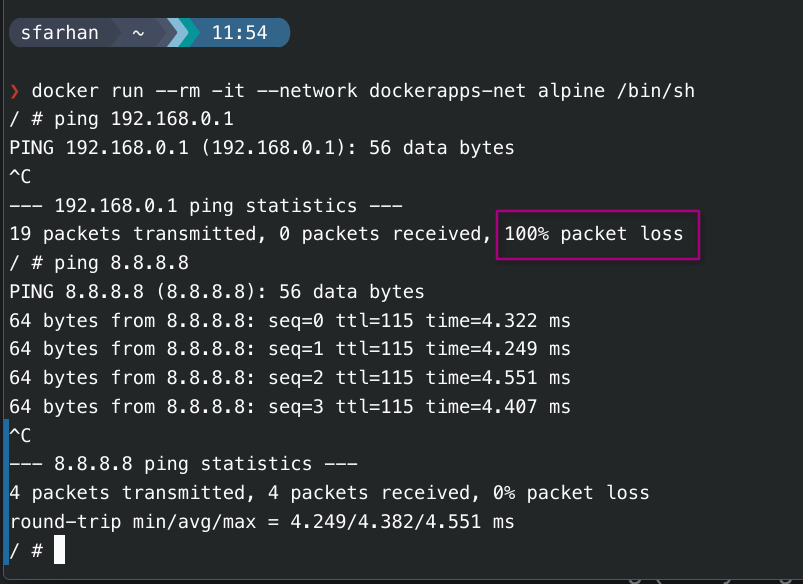
Check Direct Rules:
Since Direct Rules do not show up in standard zone lists (--list-all), use this:
sudo firewall-cmd --direct --get-all-rules
Expectation: We should see the
ipv4 filter DOCKER-USER ... DROPrule listed.
View Permanent Configuration File:
cat /etc/firewalld/direct.xml
DOCKER-USER chain and rules.
Future Roadmap: Pangolin Setup on a VPS
Looking into implementing an external tunneling layer using Pangolin
Instead of exposing our Home Public IP directly (via Port Forwarding 80/443), we tunnel traffic using Pangolin through a cheap VPS.
-
Concept: A self-hosted alternative to Cloudflare Tunnels (using WireGuard).
-
Architecture:
User->VPS (Oracle/Hetzner)->Pangolin Server->WireGuard Tunnel->Home Server (Newt Client)->Caddy -
Benefits:
- Hidden Home IP: Attackers only see the VPS IP. If the VPS is attacked, our home internet stays up.
- Bypass CGNAT: Works even if the ISP doesn't give us a public IPv4.
- Portability: We can move the home server anywhere physically without updating DNS records.
-
Integration: Pangolin integrates natively with CrowdSec, allowing us to block attacks at the VPS level before they even touch the home fiber.
Additional Bot Mitigation (L7)
If we notice high-volume "scraping" or bot attacks on specific pages (e.g., login pages), we can layer additional defenses.
Caddy Rate Limiting
Since we already use Caddy, the rate_limit module is the most efficient first step. It is faster than Fail2Ban because it handles drops in memory.
-
Config: Limit requests to
/loginendpoints to 5 per minute. -
Implementation: Add to
Caddyfile:
rate_limit {
    zone login_limit {
        key {remote_host}
        events 5
        window 1m
    }
}
Load Fail2Ban (SSH)
While CrowdSec covers most web-based scenarios, Fail2Ban is excellent for SSH protocol protection if we ever expose SSH.
CrowdSec AppSec (WAF)
The next logical step for web security is enabling the AppSec Component in CrowdSec.
-
Role: Acts as a WAF (Web Application Firewall) inside the CrowdSec agent.
-
Capability: Detects "Virtual Patching" attacks, SQL Injection, and XSS attempts that standard log parsing might miss.
-
Implementation: Requires enabling the AppSec collection in
acquis.yaml.