🌐 Networking
Network Architecture
| Network Plane | Type | Subnet | Role |
|---|---|---|---|
| Zone 1: Trusted | Docker Bridge | 172.20.0.x |
Internal communication. Services here talk to Caddy and each other. |
| Zone 2: Secured | VPN Tunnel | N/A |
P2P Isolation. Containers here have NO IP; they piggyback on Gluetun. |
| Zone 3: Mgmt | Tailscale | 100.x.x.x |
Remote Management. Bypasses Caddy/Firewalls for "Emergency Access." |
Zone 1: The App Network (dockerapps-net)
This is the backbone bridge network. Unlike standard Docker bridges, we explicitly define the subnet to allow for Static IP Allocation.
- IPv4 Subnet:
172.20.0.0/24 - Gateway:
172.20.0.1 - IPv6: Enabled (Mapped to
fd00:dead:beef:2::/64) - DNS: Containers inherit the Host's DNS settings (Cloudflare/Google) via
daemon.json.
Expand to View: Create Custom Network
Create the dockerapps-net bridge with isolated IPv6 subnets.
docker network create \
--driver=bridge \
--ipv6 \
--subnet=172.20.0.0/24 \
--gateway=172.20.0.1 \
--subnet=fd00:dead:beef:2::/64 \
--gateway=fd00:dead:beef:2::1 \
dockerapps-net
Zone 2: The VPN Bubble (service:gluetun)
This is a specific architectural pattern used for qBittorrent and Transmission.
The "Sidecar" Pattern
These containers do not have a network interface. Instead, they share the network stack of the gluetun container.
- Outbound: All traffic is forced through the
tun0interface (WireGuard to AirVPN). - Inbound: Ports
8080(qBit) and9091(Trans) are mapped on the Gluetun container, not the app containers. Like so:
# Gluetun compose file extract

      ports:
      # --- QBITTORRENT PORTS ---
      - 8080:8080 # qBittorrent Web UI (Host Port: 8080)
      #- 6881:6881       # QBT P2P Port (TCP) commented since using Airvpn Port Forwarding
      #- 6881:6881/udp   # QBT P2P Port (UDP) commented using Airvpn Port Forwarding
      # --- TRANSMISSION PORTS ---
      - 9091:9091 # Trans Web UI (Host Port: 9091)
      #- 6882:6882       # Trans P2P Port (TCP) commented since using Airvpn Port Forwarding
      #- 6882:6882/udp   # Trans P2P Port (UDP) commented since using Airvpn Port Forwarding
Killswitch:
If Gluetun dies, the network stack disappears. The downloaders physically cannot transmit data.
Setting up AirVPN
Selected AirVPN for this stack because it is one of the few providers that supports Port Forwarding and WireGuard simultaneously.
-
Sign Up: Created an account and purchased a subscription at AirVPN.
-
Config Generator:
- Navigated to Client Area > Config Generator.
- OS: Selected "Linux".
- Protocol: Selected "WireGuard" (Critical for speed/CPU efficiency).
- Server Selection: Selected Netherlands (primary for privacy/speed balance) and Singapore (as a low-latency backup).
-
Key Generation:
- Generated the configuration.
- Extracted the Private Key, Preshared Key, and Addresses (IPv4/IPv6) from the generated
.conffile or UI.
-
Port Forwarding (Critical):
- Navigated to Client Area > Ports.
- Generated two separate ports:
- Port A (e.g.,
xxxxx) for qBittorrent. - Port B (e.g.,
xxxxx) for Transmission.
- Port A (e.g.,
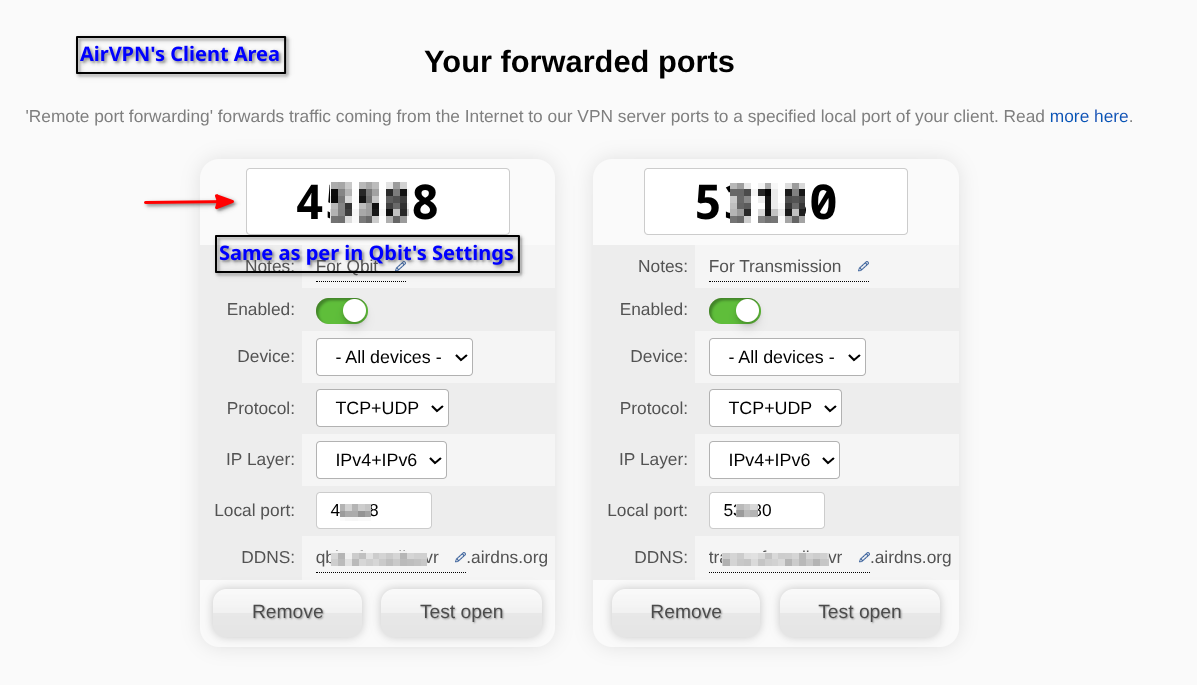
Note: These specific port numbers must be entered into the
.envfile and used in the compose file. like so:
  ```bash
  # Gluetun compose file extract

  environment:
  # --- General Settings
  - PUID=${PUID}
  - PGID=${PGID}
  - TZ=${TZ}
  # --- VPN Settings
  - VPN_SERVICE_PROVIDER=airvpn # This one is hardcoded, as it won't change
  - VPN_TYPE=${VPN_TYPE}
  - VPN_IPV6=yes
  # --- WireGuard Settings
  - WIREGUARD_PRIVATE_KEY=${WIREGUARD_PRIVATE_KEY}
  - WIREGUARD_PRESHARED_KEY=${WIREGUARD_PRESHARED_KEY}
  - WIREGUARD_ADDRESSES=${WIREGUARD_ADDRESSES}
  - SERVER_COUNTRIES=${SERVER_COUNTRIES}
  # --- Port Forwarding
  - FIREWALL_VPN_INPUT_PORTS=${AIRVPN_PORT_QBIT},${AIRVPN_PORT_TRANS} #<<- THIS!

  ```
Zone 3: The Management Plane (Tailscale)
Tailscale runs in network_mode: host on the server.
-
Role: Provides a mesh overlay network.
-
Subnet Routing: Configured as a Subnet Router (
192.168.0.0/24), allowing me to access the server's LAN IP from my phone when away from home. -
Exit Node: Enabled, allowing my phone to tunnel all traffic through the home server when on insecure public Wi-Fi.
Master Static IP Map
This is the Single Source of Truth for compose.yml static IP assignments.
| IP Address | Service | Stack | Port |
|---|---|---|---|
172.20.0.1 |
Gateway | - | - |
172.20.0.10 |
Jellyfin | media |
8096 |
172.20.0.11 |
Gluetun | gateway |
- |
- |
Qbittorrent | media |
8080 |
- |
Transmission | media |
9091 |
172.20.0.12 |
Jellyseerr | media |
5055 |
172.20.0.13 |
Radarr | media |
7878 |
172.20.0.14 |
Sonarr | media |
8989 |
172.20.0.15 |
Bazarr | media |
6767 |
172.20.0.16 |
Gotify | ops |
8081 |
172.20.0.17 |
Arcane | mon |
3552 |
172.20.0.19 |
Profilarr | media |
6868 |
172.20.0.20 |
Prowlarr | media |
9696 |
172.20.0.21 |
FlareSolverr | media |
8191 |
172.20.0.22 |
Jackett | media |
9117 |
172.20.0.23 |
Caddy | gateway |
80/443 |
172.20.0.24 |
CrowdSec | gateway |
- |
172.20.0.25 |
Homepage | mon |
3000 |
172.20.0.26 |
Dozzle | mon |
9090 |
172.20.0.27 |
WUD | mon |
3001 |
172.20.0.28 |
Socket Proxy | ops |
2375 |
172.20.0.29 |
GoAccess | ops |
7890 |
172.20.0.31 |
Beszel | mon |
8090 |
172.20.0.33 |
Kopia | ops |
51515 |
172.20.0.37 |
VoidAuth | gateway |
3002 |