☁️ Cloudflare Configuration
DDNS Setup
- Log in to the Cloudflare Dashboard.
- Click the User Icon (top right) > My Profile.
- Select API Tokens from the left sidebar.
- Click the Create Token button.
- Find the "Edit zone DNS" template and click Use template.
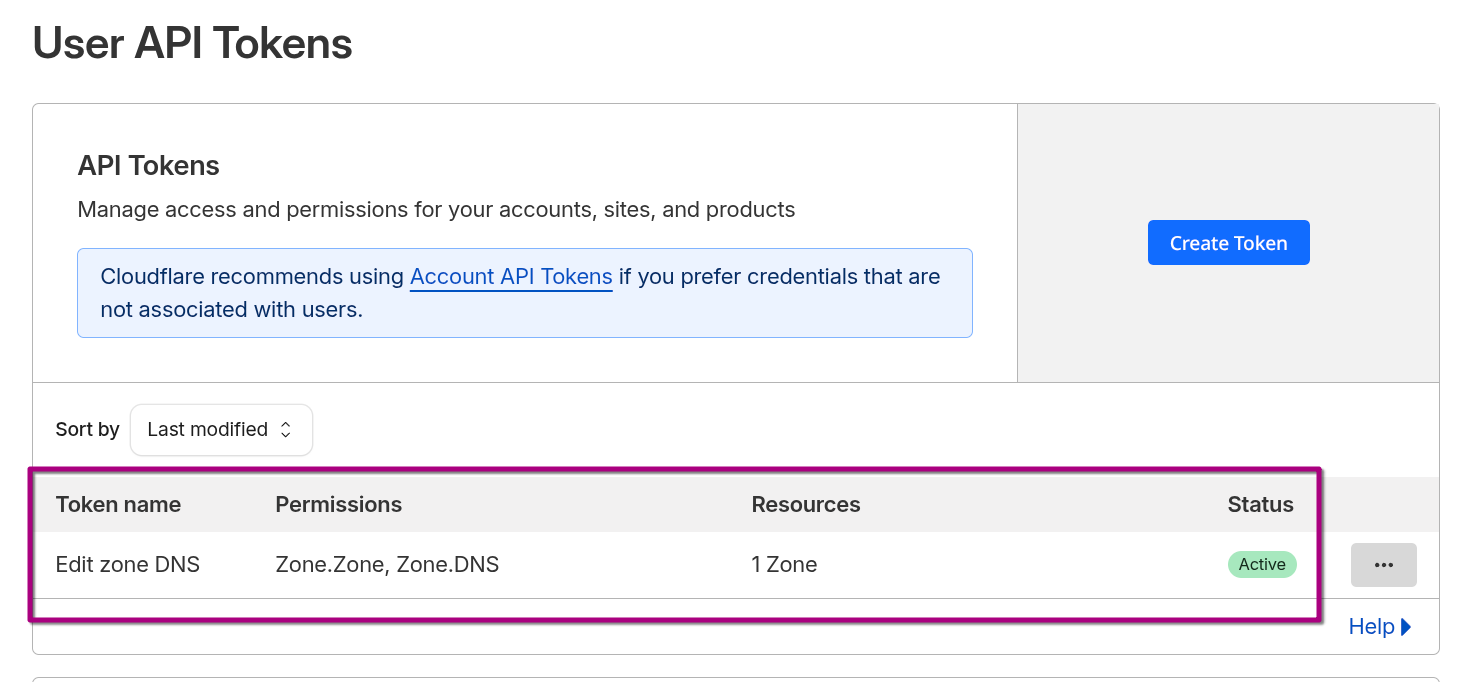
The default template is insufficient for our setup because the caddy-dynamicdns plugin requires the ability to "Read" the Zone metadata to find the Zone ID.
Zone Permissions
Modify Permissions list:
| Permission Type | Permission Name | Access Level | Purpose |
|---|---|---|---|
| Zone | DNS | Edit | Allows Caddy to update A records (DDNS) and create TXT records (SSL). |
| Zone | Zone | Read | Critical Fix: Allows Caddy to lookup the "Zone ID" for mydomain.xyz. |
Note: If
Zone:Zone:Readis missing, Caddy will fail withexpected 1 zone, got 0error.
Restrict this token so it cannot touch any other domains we might own.
- Operator:
Include - Type:
Specific zone - Value:
mydomain.xyz
Finalize:
- Click Continue to summary.
- Click Create Token.
- Copy the token immediately. You will never see it again.
-
The generated API token is stored in the .env
CLOUDFLARE_API_TOKEN=<PASTE_YOUR_TOKEN_HERE>
DNS Records Setup
All records are "Orange Clouded" (Proxied) to leverage Cloudflare's WAF and Zero Trust layers.
| Type | Name | Content | Proxy Status | Purpose |
|---|---|---|---|---|
| A | jellyfin |
1.1.1.1 (Placeholder) |
DNS Only | Media Streaming |
| A | requests |
1.1.1.1 (Placeholder) |
DNS Only | Jellyseerr |
| A | gotify |
1.1.1.1 (Placeholder) |
DNS Only | Notifications |
| A | auth1 |
1.1.1.1 (Placeholder) |
DNS Only | Authentication |
Note: Caddy's
dynamic_dnsmodule will automatically update the1.1.1.1IP to our actual IP.
IPv6 Support (AAAA Records)
While previously disabled, IPv6 is now enabled for all subdomains.
-
Confirmed stable connectivity over SG 5G networks
-
Crucial Fix: Connectivity issues were historically caused by script-injection conflicts (Rocket Loader) rather than routing.
Security & Zero Trust Set Up
WAF Security
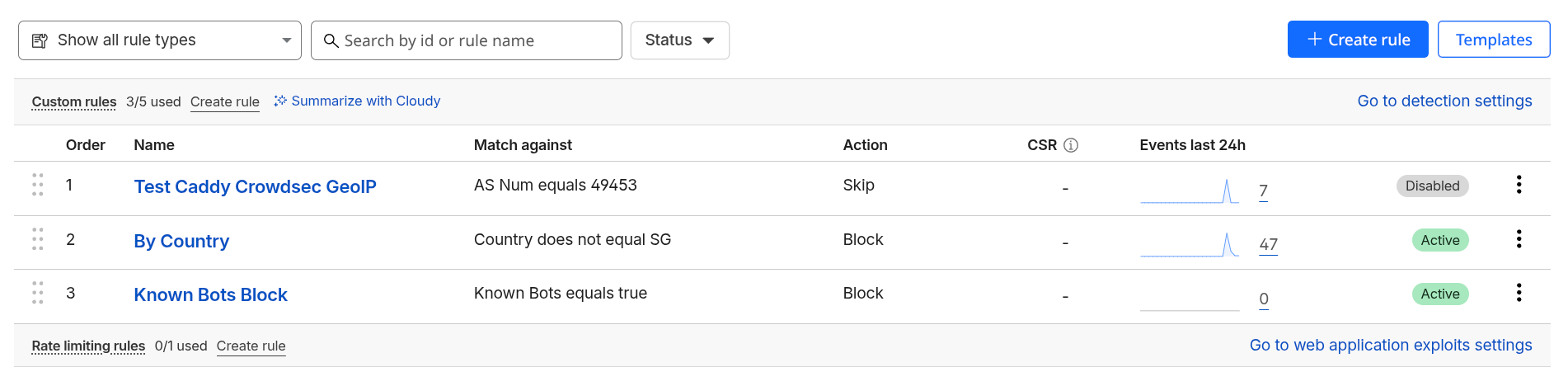
Rules are processed in top-to-bottom order to protect the origin.
Domain > Security > Security Rules
| Order | Name | Logic | Action |
|---|---|---|---|
| 1 | By Country | Country does not equal SG |
Block |
| 2 | Known Bots | Known Bots equals true |
Block |
Testing Caddy/Maxmind Geo-IP
During testing, a temporary Skip rule can be added for specific VPN ASNs (e.g., AS49453) and using my mobile phone with overseas server, to verify local Caddy Geo-IP fail-safes.
Zero Trust Applicationsb
Identity-based protection for all services.
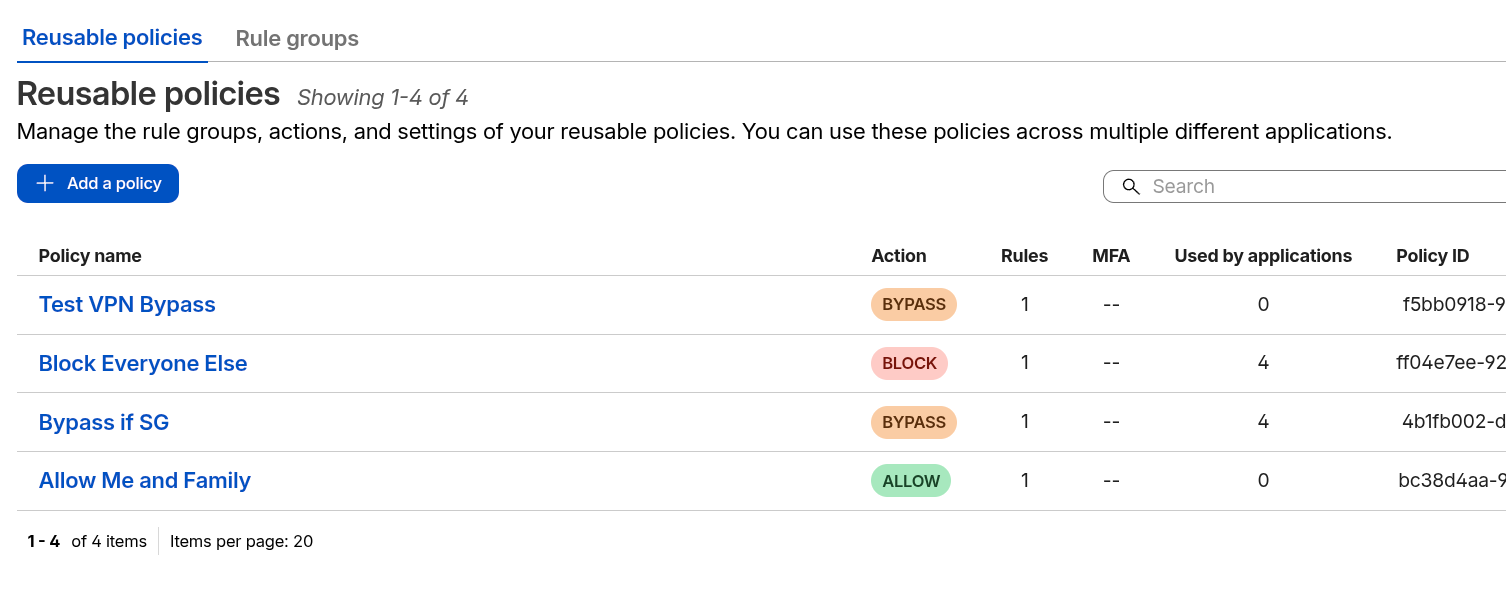
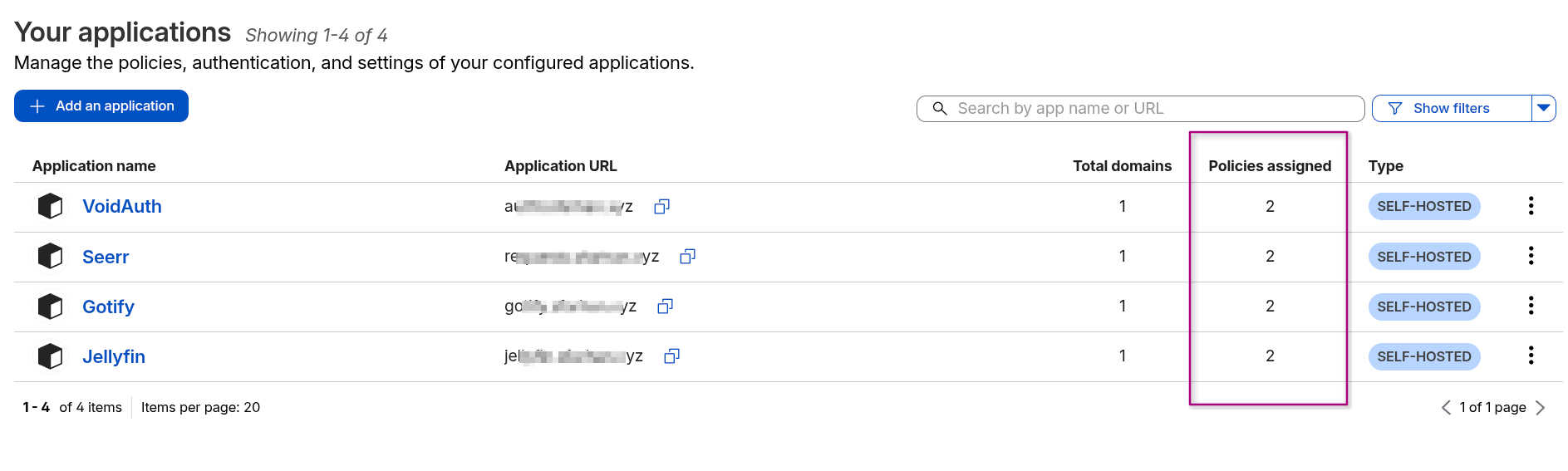
Account/Home > Zero Trust > Access Control > Policies/Applications
Create Policies:
Attach Policies to Applications:
Compatibility with Rocket Loader
Rocket Loader Conflict with VoidAuth (The "Black Screen")
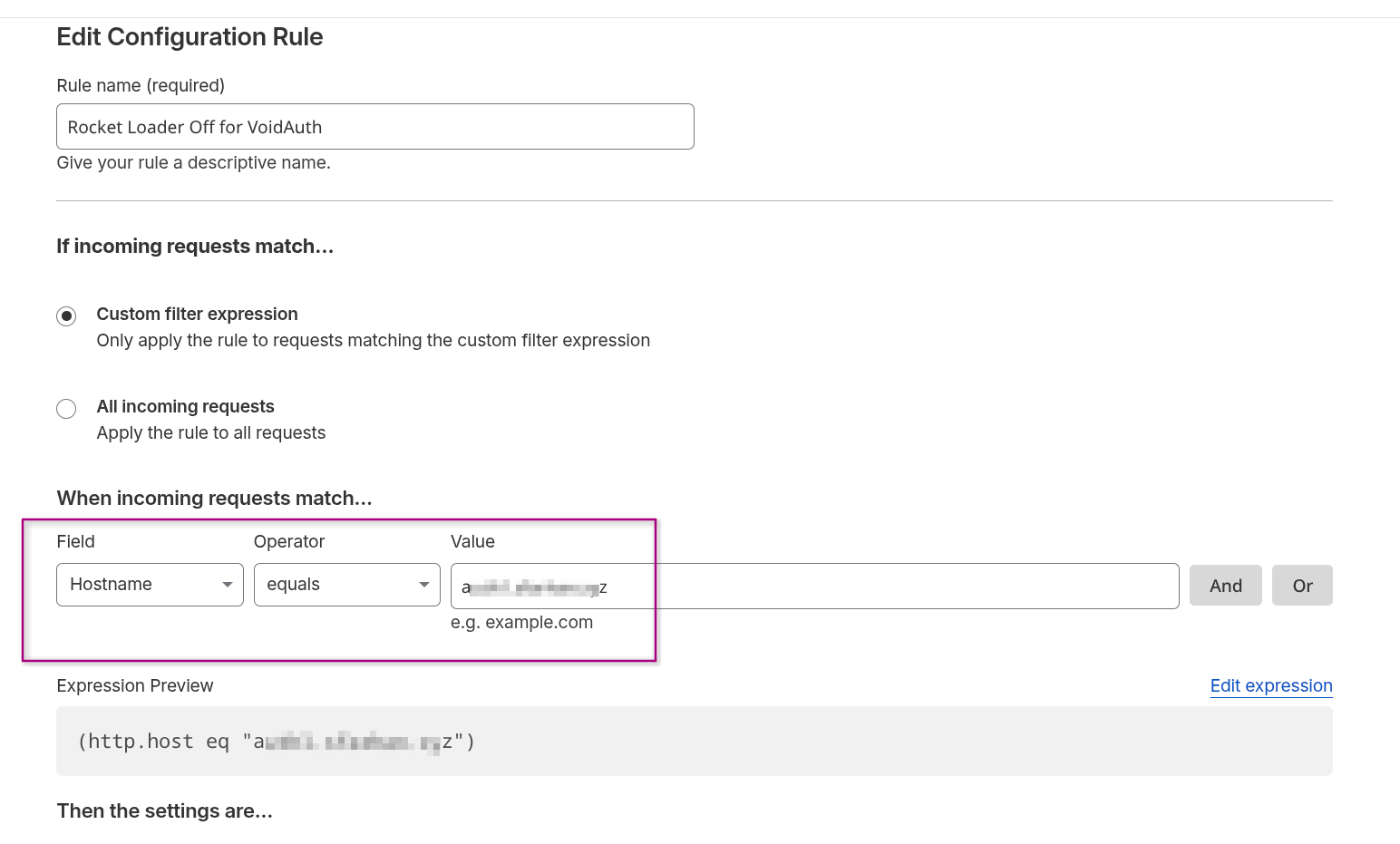
Rocket Loader must be disabled for authentication subdomains due to Content Security Policy (CSP) violations.
Domain > Rules > Overview > Create Rule > Configuration Rule
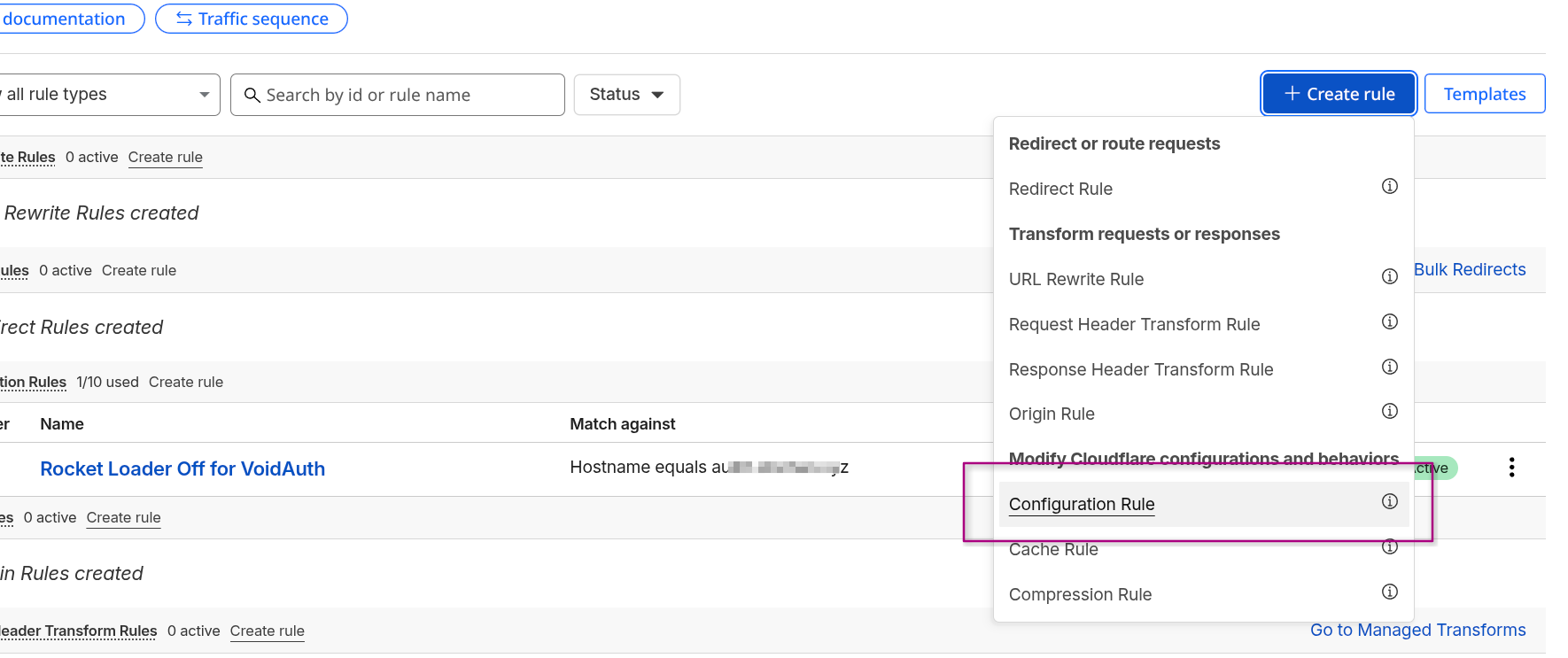
Enter Hostname of the Voidauth's instance subdomain Equals to the URL.
VoidAuth Strict CSP
When inspecting the browser, as I cannot access Voidauth's instance, noticed that the console error indicated that Rocket Loader attempts to inject rocket-loader.min.js - which violates VoidAuth's strict-dynamic CSP, thus causing the browser to block all scripts and render a blank/black screen.
Other Cloudflare's Settings
- WebSockets: Enabled (Required for VoidAuth and Gotify real-time streams).
- Pseudo IPv4: Off (Ensures Caddy sees the clean
Cf-Connecting-Ip).